Monday, November 3, 2014

Loop construct of C#/VB mapped into F#

Hi there, my blog readers!
The F# adventure series is almost complete, and F# adventure series is focusing on F# 3.0 in Visual Studio 2012. Meanwhile, there were questions addressed to me about the basic common feature of programming languages: loop.
For those of you comes from C#/VB world, F# actually has the same semantic loop constructs.
F# has these loop supports:
  1. for loops with n times (incremental for in C#,For Next in VB)
  2. for loops that iterate the elements of a collection/set/array (for each in C#, For Each in VB since VB 8.0 in Visual Studio 2005)
  3. do..while that perform loop with test condition (same as do..while in C#, While..Wend in VB)
To simplify giving you the samples, I’ll take samples of F# directly from MSDN Library, paste them, and add the same samples with C# and VB.
Starts from Visual F# MSDN Library: http://msdn.microsoft.com/en-us/library/dd233249.aspx
Let’s visit the three loop above with samples:


F# loop C# VB
// for loop with n times

for i = 1 to 10 do
  printf "%d " i

// incremental for

for (var i=1;i++;i<=10)
   Console.Write("{0:d}",i);
‘ For Next

For I = 1 to 10
    Console.Write("{0:d}",i)
Next

// Looping over a list.
let list1 = [ 1; 5; 100; 450; 788 ]
for i in list1 do
   printfn "%d" i
// for each
var list1 = new Int32 { 1, 5, 100, 450, 788 }
for each i in list1
   Console.WriteLine("{0:d}",i);
‘ For Each
Dim list1 As Int32() = [ 1, 5, 100, 450, 788 ]
For Each i In list1
   Console.WriteLine("{0:d}",i)
End For
// while..do


let lookForValue value maxValue =
  let mutable continueLooping = true
  let randomNumberGenerator = new Random()
  while continueLooping do
    // Generate a random number between 1 and maxValue.
    let rand = randomNumberGenerator.Next(maxValue)
    printf "%d " rand
    if rand = value then
       printfn "\nFound a %d!" value
       continueLooping <- false


// do

void lookForValue(Int32 value, Int32 maxValue)
{
    var continueLooping= true;
    var randomNumberGenerator = Rendom();
    do
    {
        var rand = randomNumberGenerator.Next(maxValue)
        Console.Write(rand);
        if (rand == value)
        {
             Console.WriteLine(rand);
             continueLooping = false;
        }
    } while (continueLooping)
}
‘ While..Wend

Sub lookForValue(value As Int32, maxValue As Int32)
    Dim continueLooping= True
    Dim randomNumberGenerator = Rendom()
    While continueLooping
        Dim rand = randomNumberGenerator.Next(maxValue)
        Console.Write(rand)
        If (rand == value)
             Console.WriteLine(rand)
             continueLooping = false
        End If
    End While
End Sub

There you have it now! All of those samples mapped from F# codes are semantically the same, although the low level IL implementation might be different.

In For Next, VB will hoist the variable of the loop limit first. But this will change after Roslyn compiler is shipped with Visual Studio 2015, as C# and VB now have the same compiler infrastructure.

Great question my blog reader, and I will include this in my completed F# adventure series!

Friday, October 10, 2014

Speaking on Lambda Jakarta: delivering intro to concurrency and asynchrony

Now it’s Lambda Jakarta meetup time! This meetup is on 4th October, 2014. Again, thanks to Traveloka for preparing the place for us to meet!

This time, Abdullah was presenting about the problem of concurrency titled: “Promise of Better Concurrency in Functional Programming: Big Win or BS?”. Yes, concurrency is everywhere now, and it’s becoming more and more relevant because of the fact that nowadays CPU is not getting speedier, but the CPU is keep getting denser with more core CPUs.

WP_20141004_004

Even on my laptop, the HP Envy beefed with intel CORE i7, it has 4 core and each core has 2 logical hyperthreading:

HPEnvy_TaskManager

This makes the logical overall CPU to be 8 logical CPUs! As we see, the clock speed is only at 2.39Ghz.

And this has becoming trend, not just from Intel. AMD has begun releasing microprocessor using this scheme/model.

Abdullah in his presentation was quoting this nice article from Herb Sutter (the Visual C++ lead dev of Microsoft) about “Free lunch is over.” published in 2005.

Herb_CPU_chart

He said that developer should not depend on CPU speed, instead they should begin to think on how to maximize the existing CPU cores. Otherwise the developed application will always run on one core and the rest of CPU core will be wasted. This of course will have negative impact not just on performance, but it will make the application to lose competitive factor of being efficient and support multi core.

Herb also added an undeniable fact of concurrency, it’s not just becoming relevant but it’s already relevant at the time of his writing!

The known concept of these maximizing cores to run at many cores, hence running multiple processes at a time is called parallel programming or on more abstract, parallelism.

This is the original link of the article: http://www.gotw.ca/publications/concurrency-ddj.htm

But concurrency doesn’t stop at just parallelism. Concurrency is also dealing with states, dealing with race conditions, and also traditional concept of operating system such as locks, semaphores, mutexes, and execution contexts.

Now execution contexts are becoming more relevant as the advances in hardware are allowing us to free us from having to wait for blocking operations such as I/O (including networks, printers). But then the software has to leverage this feature as much as possible by freeing current thread to be available for other execution context. The thread doesn’t have to be multithread, as you can still use the same thread but with different execution context.

This concept is known for asynchronous programming, or simply just asynchrony. Most programming languages handles this by providing state continuations such as “Futures” and “Promises”, or using complex callback with support for function as parameter (delegate in .NET, functional interface in Java 8, function in Haskell, Scala, and other functional programming languages).

I was also helping Abdullah to further explain asynchrony in the pragmatic perspective.

WP_20141004_016

The easiest way to explain asynchrony is if we are ordering food at a restaurant:

  1. We order the food/beverages and we are served by a waiter
  2. Waiter deliver the order list to the cook
  3. Waiter serves other customer without waiting the cook to complete our order
  4. Our order is complete, and the cook is telling the waiter by putting our finished order at the waiter tray (this is the callback)
  5. Waiter checks the tray, grabs the finished order, and delivers the order to us

I also promised the audience that the next meetup, I will deliver small presentation about asynchrony sample in detail Smile

The gory detail of concurrency is also nicely explained by this guy (formerly Oracle’s Java developer, now one of NodeJS founder) Bryan Cantrill in his excellent article: https://blogs.oracle.com/bmc/entry/concurrency_s_shysters

That’s all, folks!

This is the official landing page of this session’s Lambda Jakarta: http://www.meetup.com/Lambda-Jakarta/events/206904832/

If you live in nearby Jakarta, I encourage you to participate on this meetup, guys!

Friday, September 26, 2014

Presenting at MVP Community Camp for September 2014

Hi my blog audiences!

Why I have silent month of August? Don’t worry! Because I was preparing for participating at MVP Community Camp!

Previously, I was asked by Katherine Chen, my MVP Lead, whether I have some experiences with Xamarin tools at the end of July. I told her that I had some about 8-10 months of experiences, and the tool is strong!

This is the original official promotional ad:

MVP_community_camp_September2014

After it’s decided by Katherine, I got my own sessions:

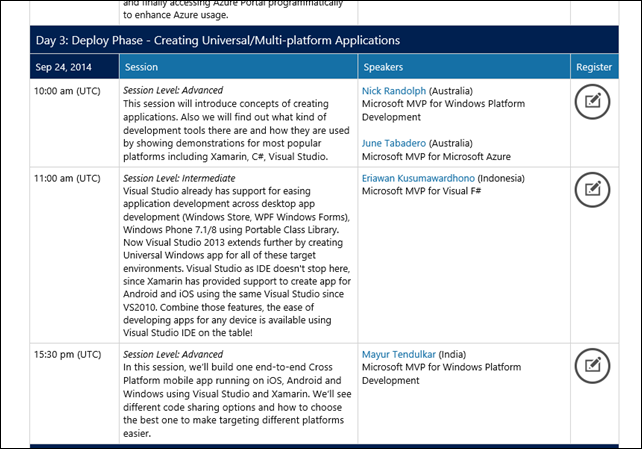
ComCampSession_20140924

Although there were some glitches when we’re rehearsing the presentations (with the assistance of Katherine), at the time of the Lync conference, the session is fine! Unfortunately the Android emulator were unexpectedly sluggish when I was having demo of running Xamarin code.

I also gave demo of The Multi Device Hybrid for Visual Studio 2013 CTP 2, fortunately the demo went well. Smile

Sunday, July 27, 2014

Speaking on Lambda Jakarta meetup delivering F#

Hi all! Time for speaking Smile

The talk is on July 26, at Traveloka headquarter. Many thanks to Traveloka!

Before that, I have to tell you now in Indonesia we have special meetup for functional programming called Lambda Jakarta! This special interest meetup is not just functional programming as general, but for more specific interest such as F#, Haskell, Scala, Clojure, OCAML, R, LISP, RUST, Erlang as well!

Just look at their logo:

full_4361622

Found in 2011, now has more than 8 active participants!

It was an initiative proposal at Ruby Indonesia meetup, initiated by Asep. Now mentored by Abdullah (a Haskell specialist, yes he’s a damn good Haskellian!).

In this meetup I deliver mostly intro to F# but with geeky introduction specific to functional programming: “Putting the functional and fun in F#”.

Here’s the starting presentation:

WP_20140726_003

And some of the audiences:

WP_20140726_006

And as of this meetup, I pledge myself to be active participant of this meetup as well! Smile

Sunday, July 6, 2014

SPEAKING and TRAINING: Giving Functional Programming awareness in Allianz

Hi all!

I got appointed to give awareness of functional programming as now Functional Programming is everywhere! Previously this is also a part of Allianz IT application development biweekly meeting, now they wanted to have sharing sessions as well!

In this presentation, I have given 50 minutes of quick intro of Functional Programming with sample in F#. The audiences was quite many, we got 25 developers, testers and one MUGI member (he’s also Allianz employee) Smile

This presentation was held on 3rd July, 2014. Here are the pictures:

ALLIANZ_Functional_01

Thanks to this guy sitting in front of me, Joerg Sauer, or giving me time and place to present Visual F#:

ALLIANZ_Functional_02


Happy coding with Functional! Go Visual F#! Smile

Friday, June 27, 2014

An adventure journey of Functional Programming and F# 2.0 in Visual Studio 2010: Part 7 of 17

Hello there!

This blog of F# contains full (long) blog posts of adventure in functional programming and F#. I call it adventure, because I’ll try to make F# as fun to as possible to learn.

NOTE:

This blog is starting to use Visual Studio from Visual Studio 2012 and Visual Studio 2013 (from Release Candidate to RTM), and provide hints of F# 3.0 in Visual Studio 2012.

Now, here are the parts:

  1. Part 1: Introduction to Functional Programming
  2. Part 2: Functional Programming Concepts
  3. Part 3: Introduction to F#
  4. Part 4: Functions, Delegates and Computation expressions in F#
  5. Part 5: F# standard libraries
  6. Part 6: OOP in F#
  7. Part 7: Using LINQ in F# (you are here)
  8. Part 8: F# Asynchronous workflow
  9. Part 9: F# MailboxProcessor
  10. Part 10: Units of Measures
  11. Part 11: F# Power Pack
  12. Part 12: F# for Silverlight 4 (and above)
  13. Part 13: A look at F# 3.0 in VS 11 (Visual Studio 2012)
  14. Part 14: A look of Functional Programming in VB 10 and C# 4.0 compared to F#
  15. Part 15: A look of F# compared to Haskell, Scala and Scheme
  16. Part 16: F# future and what features that F# must have
  17. Part 17: Retrospective


Using LINQ in F# 3.0

Before F# 3.0 in Visual Studio 2012, LINQ was not available in F#. If you use F# Powerpack for F# 2.0, LINQ was implemented as computation expression.

An overview of LINQ

LINQ stands for Language INtegrated Query. LINQ has its first release in C# 3.0 and VB 9.0 in Visual Studio 2008.

Basically, LINQ is a syntactic sugar on top of C# 3.0 and VB 9.0. It is then translated by the compiler into a series of extension method calls to Enumerable (for LINQ to Object) or Queryable (for LINQ to SQL, LINQ to Entity).

Let’s look at LINQ to Object, because this is the basic foundation of all other LINQ to others.

LINQ to Object is the basic foundation because it is available for the basic foundation of all generic or typed collection in .NET: IEnumerable<T>

Why? There are always misconception that LINQ is a mean to connect to database, and the fact is not that! LINQ is a way to query a collection of data. The data can be a single type or can be a collection.

I can also query the running processes on my machine that consumes memory more than 1 MB: (using C#)

csharp_LINQ

In VB, we can also do that:

vb_LINQ

Now we can prove that LINQ is not used only to query database.

The interesting point of using LINQ is, the from, where, select is used as keywords. The compiler will translate those LINQ keywords into series of Lambda expressions.

In C#, the code will be translated into: (the commented is the original source code)

csharp_LINQ_lambda

If you see the source code very well, you’ll also notice that there are type inferences in action! But the type inferences in C# and VB are different with F#.

In C# and VB, type inferences are happened in local scope, and also for method’s parameter but not for the method return type.

F# will deduce an infer the return type of the method gracefully and flows nicely outside the scope of the methods.

F# 3.0 LINQ query expressions

Let’s dive into F# 3.0 LINQ!

LINQ in F# 3.0 was composed using monad builder, by a class names QueryBuilder. The complete fully qualified class name is Microsoft.FSharp.Linq.QueryBuilder. Don’t worry, you don’t have to use it directly because it’s composed for us to be used nicely as composable query.

In F# 3.0 the code will be:

fsharp_LINQ_simple01

The interesting aspect is the use of Seq.ofArray. Let’s say we’ll delete the use of Seq,ofArray, run the code, and display the result using the F# interactive:

fsharp_LINQ_without_seqofarray

Now with Seq.ofArray added, the result is much simpler and also nicer to observe:

fsharp_LINQ_with_Seqofarray

Without Seq.ofArray, the F# interactive will display all of the resulting array of Process.GetProcesses after it display the result of running process. Because the basic behavior of GetProcesses is eager evaluation, not lazy evaluation. Seq.ofArray pipeline will execute it lazily, only evaluate it as needed.

The type inference will infer that array of Process is a derived from IEnumerable<Process>. It is also true in C# and VB.

In the F# code, I also use sortByDescending to sort the result descending, based on the size (using property of WorkingSet64). It is equal to order by in C# and VB with descending option added.

What about the semantic? The semantic is the same, only few clause has different semantic.

This is the table of semantic and syntax differences between C#, VB and F#:

fsharp_LINQ_featurecompare

Notes:

All of the aggregates are not available in LINQ of C# and VB in a query comprehension. F# has integrated in the query computation, as with other SQL clauses (FROM, SELECT, WHERE, JOIN, GROUP BY).

Those query operations that has no semantic differences are really having the same calls to the same methods of LINQ to object. Having no semantic differences means that it’s guaranteed for F# to have the same results as in C# and VB.

We have known SELECT, WHERE, and ORDER BY in F# and a hint of “take”. They are very simple to use, and it has the same semantic although the syntax of ORDER BY in F# has different name, using sortBy.

This is F#’s groupBy in action:

(I intentionally group the processes by ProcessName, and then display the number of grouped process)

fsharp_groupby

As usual, svchost has the largest number of instances.

Note:

The groupBy sample has Count(), and this require System.Linq.
Iterating the result of group by requires us to look at the Key collection first, then the grouped data. Why?

Due to the returned result of groupBy is the same as Enumerable.GroupBy, that returns a IDictionary<Key,Value>.

It returns a dictionary because of the nature of group by: the result is grouped by a key, then each key will have values that grouped by the key.

Now, I’m going to display the maximum amount of memory taken by those process.

This is the code using maxBy:

fsharp_LINQ_maxBy

Those equalities of query operators table is not displaying all, actually. But it can be considered the same as the operations in System.Linq.Enumerable extension methods.


Further readings

Tuesday, June 10, 2014

An adventure journey of Functional Programming and F# 2.0 in Visual Studio 2010: Part 6 of 17

Hello there!

This blog of F# contains full (long) blog posts of adventure in functional programming and F#. I call it adventure, because I’ll try to make F# as fun to as possible to learn.

NOTE:

This blog is starting to use Visual Studio from Visual Studio 2012 and Visual Studio 2013 (from Release Candidate to RTM), and provide hints of F# 3.0 in Visual Studio 2012.

Now, here are the parts:

  1. Part 1: Introduction to Functional Programming
  2. Part 2: Functional Programming Concepts
  3. Part 3: Introduction to F#
  4. Part 4: Functions, Delegates and Computation expressions in F#
  5. Part 5: F# standard libraries
  6. Part 6: OOP in F# (you are here)
  7. Part 7: Using LINQ in F# (and the upcoming F# 3.0)
  8. Part 8: F# Asynchronous workflow
  9. Part 9: F# MailboxProcessor
  10. Part 10: Units of Measure
  11. Part 11: F# Power Pack
  12. Part 12: F# for Silverlight 4 (and above)
  13. Part 13: A look at F# 3.0 in VS 11 (Visual Studio 2012)
  14. Part 14: A look of Functional Programming in VB 10 and C# 4.0 compared to F#
  15. Part 15: A look of F# compared to Haskell, Scala and Scheme
  16. Part 16: F# future and what features that F# must have
  17. Part 17: Retrospective


OOP in F#

F# is not just a functional programming language, but it is also an object oriented programming language which also an imperative programming language.

The OOP feature of .NET are supported by F#, including interfaces, classes, inheritances, method overrides, overloads.

The classes created in F# can be used in C#, VB and others because it’s generated into the same IL that C#, VB and other have (as long as the IL is standard .NET CLR’s IL).

This OOP feature is where the flexibility of F# has risen above all other functional programming languages that only offers pure functional programming languages. But this flexibility also marks F# as non pure functional programming language.

Why? This is where the critics often attack F#. Before diving deeper into F# OOP, I'm going to introduce a very quick glimpse of OOP.

OOP often described as how you develop software using object as the main attention.

An object in OOP is an object that has attributes and behaviors, just like us humans.

Attributes can be name, address, gender, nationality. Behaviors in OOP are the common capabilities that we have, such as Walk, Run, Eat, Drink.

This is a simple illustration of human as object:

simple_oop_illustration_6F308F4D

We can often inherit our attributes (but not all) from our parents, and so does our behaviors. This is called inheritance, the most common known concept part of OOP.


OOP first stop: Inheritance, Polymorphism, Encapsulation

Inheritance in OOP is really what makes OOP really shines: the ability to inherit an available object with all of the visible allowed attributes and behaviors.

It is called visible allowed attributes, because there are scope modifiers at the attributes that control this visibility.

In F#, these are allowed scope modifiers:

  • public
  • private
  • internal (the scope is only assembly scope)

F# does not allow protected modifier, like those in C# and VB.

But this OOP doesn’t stop just having inheritance.

Generally OOP has these 3 concepts:

  • Inheritance
  • Polymorphism
  • Encapsulation

So, what are Polymorphism and Encapsulations?

Polymorphism is concerning the change of behavior when an object inherits other object, this is why there are method overrides that define behavior overrides.

Encapsulation means an object is known to outside by having definition of attributes (properties in .NET and C#/VB/F#) and behaviors or operations.

In F#, OOP is supported in the form of class and interface.


Interface in F#

Interfaces in F# are implemented in two ways:

  • Using object expressions
  • Using class types

To create interfaces using class types are quite straightforward, the syntax is similar to interface declaration of C# and VB.

This is the syntax using class types:

// Interface declaration:
[ attributes ]
type interface-name =
   [ interface ]
     abstract member1 : [ argument-types1 -> ] return-type1
     abstract member2 : [ argument-types2 -> ] return-type2
     ...
   [ end ]

This is a sample code of creating interfaces using class types (from F# in Visual Studio 2010 Tutorial template):

type IPeekPoke =
    abstract Peek: unit -> int
    abstract Poke: int -> unit

The IPeekPoke will be treated as interface and will have the same signature as declaring interface in C# and VB. By default, the access modifier when not specified is public. This interface can also contain other members not just methods, but it can contain properties:

type IConnectionFactory =
    interface
        abstract ConnectionString : string with get, set
        abstract ConnectionState : int with get
        abstract Open : unit -> unit
        abstract Close : unit -> unit
    end

The interface declaration above can also be written to omit interface keyword that ending with end keyword:

type IConnectionFactory =
    abstract ConnectionString : string with get, set
    abstract ConnectionState : int with get
    abstract Open : unit -> unit
    abstract Close : unit -> unit

The type IConnectionFactory simulates a database connection commonly found in System.Data. It demonstrate an abstract property of ConnectionString with setter (set) and getter (get), ConnectionState that has getter only, and abstract method of Open and Close.

Note that F# clearly defines that each method that has no parameter and returns no parameter has to have signature as unit, returning no parameter as unit.

To create interface using object expressions, the interface are declared within a class. This is the syntax:

// Implementing, by using an object expression:
[ attributes ]
let class-name (argument-list) =
   { new interface-name with
       member self-identifier.member1 argument-list = method-body1
       member self-identifier.member2 argument-list = method-body2
       [ base-interface-definitions ]
   }
 

member-listThis is a sample of interface implemented using object expressions:

let makePrintable(x: int, y: float) =
    { new IPrintable with
              member this.Print() = printfn "%d %f" x y }
let x3 = makePrintable(1, 2.0)
x3.Print()

The advantages of using the object expression syntax are subtle: the interface does not have to be named and the scope of the interface is not visible from outside. Concrete implementation has to be implemented directly inside the class. But the disadvantage of using this syntax is quite clear; this syntax has no comparable features in C# and VB.
Create type that implements interfaces
To create types that implements interface, the interface must be declared using class type syntax.

For example, we can create type that implement IPeekPoke interface above:

// Types: classes with interface implementations
// ---------------------------------------------------------------
/// A widget which counts the number of times it is poked
type Widget(initialState:int) =
    /// The internal state of the Widget
    let mutable state = initialState
    // Implement the IPeekPoke interface
    interface IPeekPoke with
        member x.Poke(n) = state <- state + n
        member x.Peek() = state
    /// Has the Widget been poked?
    member x.HasBeenPoked = (state <> 0)

Now, to call the method of the interface, F# requires the call to be explicit to specify the interface, and this is clearly specified in MSDN Library:

"Interface methods can be called only through the interface, not through any object of the type that implements the interface. Thus, you might have to upcast to the interface type by using the :> operator or the upcast operator in order to call these methods."

This is a sample code to call methods of IPeekPoke:

let widget = Widget(12) :> IPeekPoke
widget.Poke(4)
let peekResult = widget.Peek()

There is an alternative syntax to call interface method.

An alternative is to declare a method on the object that upcasts and calls the interface method, as in the following example, with comparison of having an added sample of using upcast of above:

type IPrintable =
   abstract member Print : unit -> unit

type SomeClass1(x: int, y: float) =
   interface IPrintable with
      member this.Print() = printfn "%d %f" x y

type SomeClass2(x: int, y: float) =
   member this.Print() = (this :> IPrintable).Print()
   interface IPrintable with
      member this.Print() = printfn "%d %f" x y

// sample usage
let x2 = new SomeClass2(1, 2.0)
x2.Print()

The code of SomeClass2 declaration define member Print that has upcast to IPrintable.Print and also has concrete implementations of Print method.


Class in F#

A class in F# is the same class in C# and VB. A class can have properties and methods, with fields as well.

Class in F# is quite straightforward. You can create class with no constructor or with default constructor with parameters.

Declaring a class with no constructor will imply that the class will have default constructor that has no parameter.

This is the base syntax:

fsharp_class_declaration_7A0D7095

In the preceding syntax, the type-name is any valid identifier. The type-params describes optional generic type parameters. It consists of type parameter names and constraints enclosed in angle brackets (< and >). The parameter-list describes constructor parameters. The first access modifier pertains to the type; the second pertains to the primary constructor. In both cases, the default is public.

A class that inherits from specific type is defined using inherit keyword. If there’s no inherit, then the class is automatically or implied to be derived from System.Object, just like every classes in .NET.

This is a very simple but good sample from Tutorial.fsx from F# template:

fsharp_class_sample_58419804

When you define types that reference each other in a circular way, you string together the type definitions by using the and keyword. The and keyword replaces the type keyword on all except the first definition, as follows.

This is why in MSDN called as "Mutually Recursive Types".

A sample of mutual recursive type:

fsharp_mutual_recursive_type_3CBC9601

You can also add generic type parameter for the type.

Generic in F# is declared in “<generictype>” syntax, like “<’T>” with single quote added to differentiate a concrete type or truly generic type.

This is a sample of generic in class declaration:

fsharp_generic_class_143DB3ED


Defining abstract classes

F# also supports abstract class. An abstract class in F# is the same abstract class in C# and VB, and it’s also semantically the same.

An abstract class in OOP is simply a class that has abstract method or properties with no implementation body but abstract class can also have concrete method.

In F#, abstract class must have AbstractClass attribute. The abstract method and properties must have abstract keyword as identifier.

Sample abstract class:

fsharp_abstractclass_sample01_7924E4DE

The class that derives from an abstract class MUST implement all of the abstract members.

Sample derived class from Shape2D class:

fsharp_abstraclclass_sample_concrete_6F1043B3


Declaring properties in F#

Property in F# is the same as property in C# and VB, and they are also semantically the same. This is also one advantage of F# of seamlessly interop with C# and VB to have OOP support, not just interface and classes supports.

Declaring properties is simple, using member keyword with the desired set and get.

NOTE: when defining properties, all property value  is mutable by default because of the nature of getter and setter in OOP.

Syntax:

fsharp_property_syntax_65D40872

Declaring the property starts with member keyword, with the combined get and set accessors.

If the get and set are combined, with keyword must be used.

Sample:

fsharp_property_sample01_2314BD3A

Or we can use separate set and get, like this sample:

member this.MyReadWriteProperty with get () = myInternalValue
member this.MyReadWriteProperty with set (value) = myInternalValue <- value

Begins with F# 3.0 in Visual Studio 2012, F# can use auto properties just like auto properties in C# and VB.

Sample of auto properties:

fsharp_property_autoproperty_sample_2F363761


Further reading

  1. Tutorial of OOP in Java (but it can be applied in .NET): http://docs.oracle.com/javase/tutorial/java/concepts/
  2. Interface in F#: http://msdn.microsoft.com/en-us/library/dd233207.aspx
  3. Classes in F#: http://msdn.microsoft.com/en-us/library/dd233205.aspx