Showing posts with label Visual Studio release state update. Show all posts

Sunday, March 19, 2017

Current state of Visual Studio releases [March 2017]

HI guys! We all know that Visual Studio 2017 has been released! Not jus that, at the time of the release of Visual Studio 2017, Team Foundation Server 2017 (on-premise) is reaching Update 1. There are also some news about Visual Studio 2017, TFS 2017, and the whole tooling and ecosystem as well.

On Visual Studio releases from January 15 to March 15, 2017, these are the notable news:

  1. Visual Studio 2017 is reaching RTM (or RTW, release to web) on March 7 
  2. Visual Studio Team Foundation Server 2017 is now at Update 1 on March 7
  3. General release of Azure Functions support of F# on March 16

Now, let’s start from the latest.


Visual Studio 2017 is reaching RTM

Yes! Visual Studio is reaching RTM! The launch is 2 days event: March 7 to 8. It was broadcasted live, and this is also the 20th anniversary of Visual Studio since the first release of Visual Studio 97. Yes, Visual Studio is reaching more than maturity, if you follow Visual Studio history itself and also one year of iterations/releases can mean more than one year in actual maturity of a software product!

This is the original page of Visual Studio 2017 launch: https://launch.visualstudio.com/

The plan for the launch is already announced at Visual Studio’s blog team on February 9: https://blogs.msdn.microsoft.com/visualstudio/2017/02/09/visual-studio-2017-launch-event-and-20th-anniversary/

The original version “1” of Visual Studio is released in around early 1997, it is dubbed as Visual Studio 97. The blog shows the VS 97 setup display:

Previous Visual Studio releases has took quite long unpredicted schedule, especially from Visual Studio 6 (also called Visual Studio 98) to Visual Studio .NET. It takes more than 4 years! Since year 2000, one year in software development can mean anything especially when the other IDE competitors such as Eclipse, Netbeans and Jetbrain’s IntelliJ have been racing to have its own unique/distinctive features as competitive advantages.

So we can safely say that the release is not so surprising, because of the previous VS 2017 release candidates from RC1 to RC4. This announcement also has proven that Visual Studio has very tight cadence, and be prepared to see the next release of Visual Studio 2017 for every 18 months!

Visual Studio 2017 is basically contains these remarkable new features:

  1. Installation is defined as “workload”, categorize common scenarios of Windows development, game development, UWP development, Unity development, Data science, etc
  2. This is the initial release of Visual Studio to use CPS as its project system instead of legacy MSBUILD project system. But MSBUILD is still used to build almost all of the project within Visual Studio, especially .NET related projects (including full .NET Framework, .NET Core, .NET Standard)
  3. This is the initial release of Visual Studio to support .NET Standard. This tooling support is supposed to be available in VS 2015 too, but now all of the effort of .NET Standard support is focused on VS 2017.

For a detail list of what’s new in Visual Studio 2017 RTM, I will describe in a separate blog post after this.

Some things in Visual Studio 2017 are still not addressed/solved

Looking at the long history of Visual Studio releases, these are the remaining interesting issues still remain:

  1. Portability of installation of Visual Studio (since the beginning of Visual Studio)
  2. Full support of .NET Native in F# (since VS 2015 Update 3)
  3. Some of the tools are not mature enough, such as tooling for developing Azure Functions in F# (since VS 2015 Update 3)

Now, let’s start to discuss some of those points below.

Portability of Visual Studio installation

There is one thing for sure, Visual Studio cannot beat Eclipse full portability download. This issue is still tracked as feedback in Visual Studio uservoice feedback: https://visualstudio.uservoice.com/forums/121579-visual-studio-ide/suggestions/6669672-wouldn-t-it-be-nice-if-visual-studio-could-work-li

Unfortunately, this feedback has been going under indefinite status of “UNDER REVIEW” for more than 3 years:

VisualStudio_portable_feedback

Look at the number of votes! More than 2000 votes, this means this proposal should be heard and considered. Any rejection to this proposal has to be strongly reasonable, otherwise the unreasonable rejection will bring harm to the Visual Studio community as a whole.

Having a portable installation or setup of Visual Studio means that we should have less worry about installation setup, settings, registry, and many others. This also means that any toolings/extensions for Visual Studio must not depends on registry as well, just like Eclipse ecosystem and Eclipse PDE.

No .NET Native full support for F#

Yes, this is crucial and it’s often overlooked. No full support for .NET Native toolchain means that we cannot develop UWP (Universal Windows Platform, the Windows 10 store application) applications using F#.

This might be a strong statement, but I’ll try to explain this to you:

  • .NET UWP application is usually distributed on Windows Store
  • Any .NET UWP application submission to Windows Store is checked against .NET Native release binary
  • Currently in VS 2015 Update 3 and VS 2017, there is no .NET Native toolchain support to support F# generated IL.
  • Therefore, it can be considered impossible to implement all UWP applications in F#

Fortunately, the whole dev team at Microsoft has been aware of this since VS 2015.

We know that F# tooling and compiler is open source, and there has been heroic efforts by F# community members and MIcrosoft’s F# and other .NET team members to solve this by closing the gaps of F# feature with .NET Native.

One big major setback of .NET Native lack of features is the availability of tailcall optimization.

To track the update of the .NET Native support for F#, this is the GitHub issue link under Microsoft Visual F# repository:

https://github.com/Microsoft/visualfsharp/issues/1096


Visual Studio Team Foundation Server 2017 Update 1 is released

Yes! Visual Studio TFS 2017 Update 1 is released at the same time with Visual Studio 2017. It is also mentioned at the launch page.

There is also official announcement from Brian Harry, although it is a little bit late: https://blogs.msdn.microsoft.com/bharry/2017/03/08/team-foundation-server-2017-update-1-available/

This is the official link to the release notes: https://www.visualstudio.com/en-us/news/releasenotes/tfs2017-update1

This Update 1 cannot be ignored, because it has quite tons of new features! In my own personal opinion, these are the most notable additional features of TFS 2017 Update 1:

  1. Personalized welcome page. This is very refreshing and it’s now easier to navigate if we have many team projects.
  2. In the Git support, we can now search for commit in a branch
  3. In the Git support, administrative privileges are now becoming more granular, especially when dealing with repo creation and repo deletion.
  4. In the Git support, we can now have nice preview of markdown editing.

The personalized link of TFS 2017 Update 1is currently the same web page of the page of my own VS Team Service account:

VS2017_TeamService_2017February

All of the team projects you have will be listed based on your customized list, and if you hover on the team project name, it will display all of the additional link such as the Dashboard, Code, Work, Build and Release, Test.

In the PR comments, it’s a welcome addition to see basic editing tool and preview available:
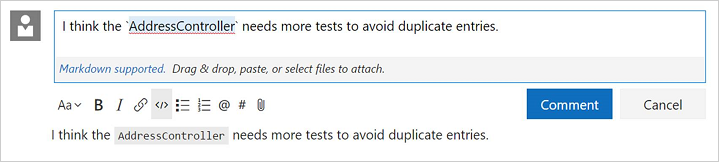
NOTE:

  • on TFS 2015, Build and Release are under separate page.
  • TFS 2015 Update 3 can accommodate markdown in the PR comments, but the basic editing tool is not available.

While this release of TFS 2017 Update 1 is so promising, I believe many companies are not ready yet to move from TFS 2015 Update 3. Because again, the TFS cadence is becoming shorter than before, and now the race to always have updated TFS might be solved by always using the online Team Services, although some companies are not willing to go to this path because their code is very precious.


The official release of Azure Functions support for F#

Yes! Now we can create Azure Functions using F#, although F# support has been previewed before.

Azure Functions is a serverless application, it is actually a simplified model of already existing Azure Web Jobs. But this serverless model means that we are not dealing with the detail of how the function is deployed, on what platforms, and other things. We are only focusing on the correctness of the functions, and how we are executing it.

Azure Functions itself is generally available since November 2016, according to this Azure’s official blog article: https://azure.microsoft.com/en-us/blog/announcing-general-availability-of-azure-functions/

The initial launch of Azure Functions only support C#, Powershell, Bash, Python. At that time, F# support was still in preview and a little bit unstable.

Fortunately support for F# is now officially stable: https://blogs.msdn.microsoft.com/appserviceteam/2017/03/16/azure-functions-f-support-is-now-generally-available/

They also have this picture of love relationship of Azure functions and F#:

This is soooo cool!

I have discussed and presented Azure Functions in F# at the meetup of Lambda Jakarta on March also, and the reaction is so priceless although some of the invited and joined guests weren’t there.

This was the picture of myself presenting and demoing Azure Functions in F#:

LambdaJakarta_2017_March_present

Here’s my Azure Functions sample (edit and test it directly):

AzureFunctions_Demo_LambdaJakarta

I know that the demo is so simple, but this Azure Functions is much more powerful than Amazon AWS Lambda compared to the readiness of toolings and the full Continuous Integration that Azure has.

This is the landing page of Azure Functions: https://azure.microsoft.com/en-us/services/functions/

The Azure Functions template and the inclusions of libraries are open source! This is the official GitHub landing of Azure Functions: https://github.com/Azure/Azure-Functions

We have GitHub’s Azure functions page, and therefore we can contribute as well!

Next blog entry: the full journey of the new features of VS 2017.

Thursday, March 31, 2016

Current state of Visual Studio releases [March 2016]

Hi there, my blog readers!

I’m back to regular updates of giving what happened in Visual Studio world from February 2016 to the end of March 2016. It’s a bit late (31st March) as there are exciting news!

There were interesting news, including the update of Visual Studio, .NET Core, ASP.NET Core, the shocking nice update: Microsoft acquired Xamarin!

These are the updates from February 2016 to the end of March 2016:

  1. Microsoft acquired Xamarin! – February 25, it was discussed by Scott Gu in his blog entry, also in Xamarin’s blog, as well as others from Wall Street Journal, TechCrunch, etc.
  2. Visual Studio TFS 2015 Update 2 goes RTM!– March 30, 2016, – complete TFS 2015 Update 2 description is available at the official VS TFS 2015 Update 2
  3. Visual Studio 2015 Update 2 goes RTM! – March 30, 2016, – complete Update 2 description is available at the official Visual Studio release note page
  4. Microsoft joins Eclipse Foundation, as described in Brian Harry’s blog and in Visual Studio’s blog.
  5. Visual Studio 2005’s end of support announcement – March 11, 2016 – The official end of date is April 12th, 2016 but it is announced on this Visual Studio blog

These updates are cool! Especially on Xamarin’s acquisition and VS 2015 and TFS 2015 Update 2 releases.

Microsoft acquired Xamarin

Yes, Microsoft acquired Xamarin! Now Miguel de Icaza joins Microsoft as part of Microsoft developers. All of the Xamarin employees are part of Microsoft as well.

For more details, please read Microsoft official announcement in Scott Gu’s blog entry.

We are going to have Microsoft Xamarin Studio? Or new name? This is interesting!

Visual Studio 2015 Update 2 RTM

Yes, we have Update 2 RTM! To me, the most noteworthy notes in this Update 2 release are:

  1. Git indicator of committed changes that not yet pushed and uncommitted local changes
  2. Git submodule update is now available when submodule has to be refreshed for update
  3. Add support for these Git commands: reset –-hard, cherry picking, and staging)
  4. Typescript is updated to TypeScript 1.8

And many more! Again, check the complete list of new features and bug fixes at: https://www.visualstudio.com/news/vs2015-update2-vs

For #1, we can have Git indicator on the status bar below:

VS2015_Update2_git_feature01

This is small new features but it’s very useful to see the number of changes and number of committed changes that is not yet pushed. It might be unnoticed, but this indicator can be clicked. Clicking the “pencil” icon will display the changes page if there’s committed changes. Clicking the “up arrow” will go to the Synchronization page.

These are the new supported Git commands in the Update 2:

VS2015_Update2_git_feature02

The nice thing is the Cherry-Pick support, and I’m going to use this Cherry-Pick often!

Visual Studio TFS 2015 Update 2 RTM

This update is also very good update for TFS 2015 (on premise version of Visual Studio Team Services).

The notable features are:

  1. Creating and deleting team project is now available from the web interface
  2. Work items now can be deleted!
  3. Team Foundation Server extensions!
  4. Create new branch from bugs in Kanban board (new linking capabilities)

For more complete list of new features, changes, and bug fixes, please visit: https://www.visualstudio.com/news/tfs2015-update2-vs

Next blog entry will discuss the implications of Xamarin after acquired by Microsoft!

Monday, January 25, 2016

Current state of Visual Studio releases [January 2016]

Hi my dear blog readers!

The “Current state of Visual Studio releases” series has been quite in active for about 4 months. I know this is supposed to be updated regularly, but unfortunately there are very rare notable news and updates of Visual Studio and Microsoft’s Developer Division.

Also the series got a bit delayed, because I was focusing on previous Lambda Jakarta coding dojo meetup.

From the beginning of December 2015 to 20th January 2016, these are the updates of Visual Studio:

  1. Support period ending for .NET 4, 4.5, and 4.5.1
  2. The release of Visual Studio 2015 Update 1 (on November 30, 2015)
  3. Node.js Tools for Visual Studio version 1.1 released (on November 17, 2015)
  4. First preview of Visual Studio Java Language Service for Android

Now, let’s discuss those three! Except for the last one (number #4), I haven’t got the chance to fully use it.

This is still in preview, for more information please see the blog: https://blogs.msdn.microsoft.com/vcblog/2015/11/06/java-debugging-and-language-support-in-visual-studio-for-android/

Now, let’s start!

Support ending for .NET 4, 4.5 and 4.5.1

The original announcement is here: http://blogs.msdn.com/b/dotnet/archive/2014/08/07/moving-to-the-net-framework-4-5-2.aspx

This simply translate as “Microsoft will not provide supports anymore for .NET 4.0, 4.5, and 4.5.1 and this include hotfixes for these releases”. The next message is simply please update to at least .NET 4.5.2 or even better, 4.6.

The follow up of the original announcement is here: https://blogs.msdn.microsoft.com/dotnet/2015/12/09/support-ending-for-the-net-framework-4-4-5-and-4-5-1/

The interesting fact is from the link above is:

Applications targeting a .NET Framework version that is no longer supported will not need to retarget or recompile to a newer version as they can be run on a later .NET Framework version. The .NET Framework 4.5.2 and higher versions have higher compatibility, provided by a newer feature called “quirking”. Quirking is a pattern in which a .NET Framework version maintains the semantics of earlier versions, while including updated implementations. The .NET runtime knows which of these semantics or quirks to execute depending on the .NET Framework version that the application targets. More information on migrating an application can be found on the Migration Guide to the .NET Framework MSDN article.

Put it simply, it matches with my translation above. I believe this will bring more burden on the enterprise IT operations especially those that focusing on premises (instead of cloud such as Azure), because .NET 4.5 is still quite new for them.

It’s quite new for them, because .NET 4.5 was released in 2012 (with the same release date of Visual Studio 2012, and also Windows 8/Windows Server 2012). Fast forward to now, end of year of 2015, only less than 3 years but they have to immediately upgrade. Less than three years of platform update is inevitable,

This end of support is not just for us, developers. For those develop .NET applications that runs on Azure, the upgrades on Azure are necessary. Fortunately Microsoft has provided updated images (mostly in form of Virtual Machines) that more focusing on .NET 4.5.2 and above (including .NET 4.6).

Visual Studio 2015 Update 1 RTM

This release although it might seems a service release, it really contains many new things.

These are new features brought by Update 1:

  • Visual C#
  • Debugging enhancements (Visual C++ and IDE aspect)
  • Tools for Apache Cordova (now Update 5)
  • Tools for Universal Windows Apps version 1.2

And many more! For complete list of release notes, visit: https://www.visualstudio.com/news/vs2015-update1-vs

Let’s visit some of the new features:

Visual C# new features

This Update 1 brings you C# Interactive Window and C# scripting API. This C# interactive window is very much like F# interactive window, except it has these two quite subtle differences: it has intellisense and type coloring!

csinteractive_vs_update1

If you are wondering what to do at the C# interactive window, just type “#help” like above.

And now we have C# scripting API. Unfortunately, the documentation of C# scripting API is still incomplete and I could not test it further.

One thing is still missing: VB.NET Interactive window! Unfortunately, we won’t see VB.NET interactive in Visual Studio 2015 at all, even after Update 1.


Debugging and diagnostic enhancements

In VIsual C++, now we have support for Edit and Continue for /BigObj. This looks like minor feature but this is very important, because it enables debugging with Edit and Continue support for WIndows Store applications that’s written in C++.

In Visual C# and Visual Basic, now we have “Go to implementations” feature when you activate context menu in the source code window. This item will display the implementation of the object you want to observe, not just having knowing “Go to definitions” that was available since VS 2002 (also called Visual Studio .NET 2002).

cs_gotoimplementation

Yup, it’s a minor addition but it’s useful!

There’s also enhancements on Code Analysis, but unfortunately it’s not for Visual Studio Express Edition.

Tools for Apache Cordova (a.k.a. TACO) Update 5

The notable feature is support for iOS 9 and experimental support for Android M, a.k.a. “Marshmallow”. Now TACO is maturing well. The overall experience of using this release is much better than previous releases, including better performance especially responsiveness of the emulators when running Cordova applications.

Beginning with this Update 5, the Node.js will only focus on Node.js version 5. So please update your Node.js installation as well to focus on Node.js 5 and above!

For more information on this TACO update 5, visit: http://taco.visualstudio.com/en-us/docs/release-update-5/

Node.js tools for Visual Studio version 1.1

This is a very useful tool, and sometimes I use this tool to debug certain Node.js package or applications. Having Node.js support in Visual Studio is a very nice feature although this tool is available as Visual Studio extension:

Nodejs_tool_vs

For more information, please visit the official repo of Node.js for Visual Studio: https://github.com/Microsoft/nodejstools

Yes, it’s OPEN SOURCE!

After you download from the Visual Studio Extension and Updates (or you can get from VS Gallery), simply install the MSI:

nodejs_tool_vs_installation

The installation for this release, 1.1.1 will take about 5-7 minutes on VS 2015 Update 1.

One thing you must remember: it needs Node.js at least version 0.91 but it’s recommended to install Node.js 5.

Now, Visual Studio 2015 will have these new project templates: (under TypeScript)

Nodejs_tool_vs_templates

Now, enjoy and I welcome discussions! Smile

Sunday, July 26, 2015

Current state of Visual Studio releases [July 2015]

Hi my blog readers! I know, this blog installment should be out at before 24th July, but there were some exciting news to tell!

This is the fourth installment of Visual Studio releases update. In this installment, the updates are not so much like previous (on May 2015) but it’s very worthy to know!

These are the updates:

  • Visual Studio Team Foundation Server 2015 RC2 release
  • Visual Studio 2013 Update 5 release
  • Visual Studio 2015 release

Now let’s talk about those releases!

Visual Studio 2015 RTM

Yes, Visual Studio 2015 has been released on 20th Jluy! I have described the what’s new on Visual Studio 2015 RC on the previous Visual Studio updates, now the RTM add this nice additions:

  • New support for high resolution icon for VS extensibility. This means VSX icon will scale nicely on high resolution monitors. There’s also Nuget package of Visual Studio extensibility, so VSX updates are less dependent on the standalone installer of VS SDK (like VS SDK before VS 2015)
  • Support for TypeScript 1.5. This also means support for features in ECMA 6, the current standard of Javascript.
  • Improved user account management of Visual Studio Online account and Git, also provide switchable profiles. Sweet!
  • Improved user account management for Azure AD, including supports for multiple Azure AD
  • Diagnostic tool that supports debugging of LLDB, GDB that usually used on GNU compilers. Now this addition requires some deep dive explanation, I’ll try to explain this on separate blog post after this Smile
  • Bing powered compiler help. Honestly, I haven’t tried this yet but I’ll try to tell my experience on this later
  • … and many more!

More detailed description is available at: http://blogs.msdn.com/b/visualstudio/archive/2015/07/20/visual-studio-2015-and-visual-studio-2013-update-5-released.aspx and also specifically at: https://www.visualstudio.com/news/vs2015-vs

Also there are videos to watch at the launch of Visual Studio 2015: https://channel9.msdn.com/Events/Visual-Studio/Visual-Studio-2015-Final-Release-Event

I encourage you to check those videos!

Visual Studio 2013 Update 5

Not much is new on this release, but these are the most notable additions:

  • support for Team Project renaming, including sync with local workspace. Sweet!
  • Additional query token of “current iteration”
  • Cloud based load testing. Sweet!! This feature is very worthy to have, as it’s easier to have load test in cloud instead of playing around with on premises load test.

For more information on VS 2013 Update 5, visit VS 2013 Update 5 release notes: https://www.visualstudio.com/news/vs2013-update5-vs

To download VS 2013 Update 5, go here: https://www.visualstudio.com/downloads/download-visual-studio-vs


Visual Studio Team Foundation Server 2015 RC2

Finally, Team Foundation Server 2015 (a.k.a. TFS 2015) is not just feature complete, but it’s nearing RTM release!

From Brian Harry blog post:

Our plan had been that the Release Candidate we shipped at the end of April would be our last public pre-release and that mid-July would be our RTM date.  About a week ago, I made the decision to change the plan.  Instead, we are shipping a “Release Candidate 2” now and will RTM as soon as we are ready after that.

This means TFS 2015 is not released at the same time of Visual Studio 2015 and it’ll be definitely released after Visual Studio 2015 RTM.

One thing for sure is that the support for team project rename is available on this TFS 2015 RC2, and it works the same as in VS 2013 Update 5.

To download TFS 2015 RC2, visit: https://www.visualstudio.com/downloads/download-visual-studio-vs

But by the time TFS 2015 RTM released, the download will be replaced by RTM version of TFS 2015.

Thursday, March 26, 2015

Current state of Visual Studio releases [March 2015]

Hi, my blog readers!

This is the second installment of Visual Studio releases update information on March 2015.

For complete series of Visual Studio releases update of my blog, go to: http://fsharpmonologue.blogspot.com/search/label/Visual%20Studio%20release%20state%20update

For March 2015, we have exciting news about Visual Studio! There are:

  1. Visual Studio 2015 CTP 6 (February 2015)
  2. Team Foundation Server 2015 CTP (February 2015)
  3. Tooling SDK of Windows 10 (official name: Visual Studio Tools for Windows 10 Technical Preview2015

This update is a little bit late (it should be on 19th or 20th March), as I was keeping up with the streaming broadcast of dotnetconf 2015.

The dotnetconf 2015 is an online conference for all of .NET update including .NET Core, WPF, ASP.NET, Roslyn, F# and many more!

Didn’t have time to watch? Watch or download offline at: http://channel9.msdn.com/Events/dotnetConf/2015

ENJOY!

Now, here are the updates…

Overview of the updates on March 2015


Now let’s dive into those three above!

Visual Studio 2015 CTP 6

Visual Studio 2015 is at CTP 6. The CTP marks that this release is not for “go live” or for production environment. I will keep stating (or reminding) this as many of you, blog readers, including my friends are confusing the CTP for production environment.

This CTP 6 contains these notable features and improvements:

  • UI debugging tool for XAML
  • Single sign in (with integration to other cloud based authentication)
  • Code Lens improvement for Git and also with support for C++, Javascript, and SQL script
  • Code Maps improvements such as filtering, faster display (faster diagram rendering) performance
  • Visual Studio tools for Cordova now supports Android 4.4 and 5.0 (Lollipop)
  • Javascript editor improvement: support for // TODO comments, object literal intellisense
  • and many more!

For complete list of CTP 6 release notes, visit: https://www.visualstudio.com/en-us/news/vs2015-vs

The official blog that described this release is available at:

http://blogs.msdn.com/b/visualstudio/archive/2015/02/23/visual-studio-2015-ctp-6-and-team-foundation-server-2015-ctp-released.aspx

With the release of CTP 6, it’s expected that Visual Studio 2015 is nearing the release of Release Candidate. This assumption is safe unless there is a notable bug needs to be fixed.

Special notes:

  • The UI debugging tool for XAML in CTP 6 only supports WPF. Support for Windows Store app will be available in the final release.

The UI debugging is surely a very useful feature:

Please check up the original blog post of Visual Studio for more detailed explanation: http://blogs.msdn.com/b/visualstudio/archive/2015/02/23/visual-studio-2015-ctp-6-and-team-foundation-server-2015-ctp-released.aspx

Well.. I suggest you should download the ISO instead of using web installer to minimize error while installing this CTP, since the download is more than 4GB.

Team Foundation Server 2015 CTP

Team Foundation Server 2015 CTP is the next release after the preview release (the same time at Visual Studio 2015 Preview public release).

There are not so may improvements, but the improvements are mostly worthy to be considered:

  • REST API support for TFS (previously only available for online TFS, Visual Studio Online)
  • Team build improvements, including preview on MSBuild activity on TFS web portal (when accessing TFS via web) and cross platform builds (YESSS!! not just on Windows, now on Linux, XCode, and Android)
  • Assign and invite testers
  • and more (although it’s not so numerous)

The assign and invite testers is very helpful. Now you can invite testers, attached with the test suite number to test.

This is the screenshot from VisualStudio.com website (link below):

vs2015_testers_invite

Those  screenshots are taken from the notable release notes of Team Foundation Server 2015 CTP. The official link is:

https://www.visualstudio.com/news/tfs2015-vs

Personal note on TFS:

Compared to other ALM product such as SVN or even commercial one such as StarTeam, TFS has widen the competitive edge. But compared specifically to IBM Rational UrbanCode coupled with IBM Rational Team Concert, TFS is quite on a par to IBM’s.

Visual Studio Tools for Windows 10 Preview (a.k.a. Tool for Windows 10 Preview)

Before you proceed, please read and notice my friendly reminder below.

If you want to try develop apps in Windows 10 Preview, this tooling is the one that you must install after you install Visual Studio 2015 CTP 6.

Why, because Visual Studio 2015 CTP 6 is the prerequisite of this tool.

Yes, the latest Windows 10 Preview on March 2015 is also available to be downloaded! But it is available after you join/register first for the Windows Insider program. Don’t worry, it’s totally free! Just go to this official site: http://windows.microsoft.com/en-us/windows/preview-faq

If you are done installing, there will be a new template for Windows 10 UAP (Universal App Platform) projects, not just the usual Windows 8/Windows 8.1/Windows 8.1 (phone) Universal Apps.

To bring you quick peek, I copy picture from Microsoft’s Somasegar’s blog on Visual Studio Tools for Windows 10:

vs2015_template_npd-win10

Here is the original location of Somasegar’s blog entry: http://blogs.msdn.com/b/somasegar/archive/2015/03/23/visual-studio-tools-for-windows-10-technical-preview.aspx

Now what are you waiting for? Code right now, guys! :)

Tuesday, January 20, 2015

Current state of Visual Studio releases [January 2015]

Hi my blog readers!

Begin with this date, I will post Visual Studio updates every 2 months: January, March, May, July, and so the next 2 months.

The update from me will always be released on every 19th or 20th bimonthly.

On 19th January 2015, these are the updates of Visual Studio (from the latest in January 2015 goes back to December 2014):

  • Visual Studio 2015 CTP 5
  • Visual Studio 2013 Update 5 CTP 1

Overview of the updates


Visual Studio 2015 CTP 5

This is the 5th CTP release of Visual Studio 2015. Reference:

The updates on this release are new features and bug fixes. These are the new features:

  1. XAML Language Service
  2. Timeline tool (for WPF and Windows Store 8.1 application)
  3. Diagnostic tool
  4. ASP.NET

There are bug fixes (for bugs reported in earlier version of Visual Studio 2015 CTP/Preview): http://support2.microsoft.com/kb/2967191

For more information about VS 2015 CTP 5, visit this page: http://www.visualstudio.com/news/vs2015-vs

Visual Studio 2013 Update 5 CTP 1

Yes, there will be another update for Visual Studio 2013! Personally, I thought Visual Studio 2013 Update 4 was the last update and I was wrong.

Visual Studio 2013 Update 5 CTP 1 brings only two updates:

  1. Technological improvements on debugging for DirectX 9 PS 3 depth support (DirectX 9.0c) on Windows Phones
  2. Bug fix on notification hubs

For #2, the bug (and also the fix) is described as:

FIX: You cannot dismiss developer license notifications in Visual Studio 2013 Update 4

Let me elaborate more on this bug. This bug is available since Visual Studio 2013 Update 4. After you successfully install Visual Studio 2013 Update 4 (either standalone update or as included installation of fresh installation of Visual Studio), a notification about acquiring developer license would always appear, even after you dismiss it and open another project.

For full explanation about this bug, here is the original MS KB article: http://support.microsoft.com/kb/3018885

For more information about Visual Studio 2013 Update 5 CTP 1, visit this MS KB: http://support.microsoft.com/kb/3021976

See you again in two months Smile