Saturday, December 18, 2021

[ADVENT 2021] Initial quick dive into F# 6 task computation expression

 Hi my blog readers!

First, personal announcement related to this blog:

If you follow my blog, you'll see that this blog is not quite often updated. Because many things have changed: Open Live Writer doesn't support Blogger.com anymore, and Blogger.com itself won't accept OAuth/OpenIDConnect anymore. Therefore I'm still searching for new place to blog, hopefully a new at least affordable, less than 80$ annually.

Ok, back to current blog! 

I'm humbly joining the tradition of F# Advent! This 2021, I focus on what's new on F# 6.0, and some additional notes on some of its new features.

New features of F# 6.0

I'm so excited to try F# 6.0! It is also at the same time of the release of Visual Studio 2022 and .NET 6.0!

Here are the interesting and important new features:

  1. The task { .. } computation expression to support general .NET Task (that usually done in C#/VB.NET)
  2. Simpler collection indexing syntax using expr[idx] instead of expr.[idx]
  3. Struct representations for partial active patterns (new attribute to have marking of partial active pattern as struct)

And others new features

  1. Overloaded custom operations in computation expressions
  2. "as" patterns
  3. Increased consistency of indentation and undentation in code
  4. Additional implicit conversions
  5. New number format for binary 

and many more! For more complete list, visit Microsoft F# Docs: 

https://docs.microsoft.com/en-us/dotnet/fsharp/whats-new/fsharp-6

Now let's visit F# task computation expression.

F# task computation expression

NOTE: I might be biased, but this new task computation expression is the most important, because it brings closer compatibility with async-task based programming in C# and VB.

We all know that F# already has async computation expression. This existing async computation expression also has convenient functions to interop with Task, such as F#'s Async.StartAsTask:

https://fsharp.github.io/fsharp-core-docs/reference/fsharp-control-fsharpasync.html#StartAsTask

The task computation exprerssion is better than the existing F# async computation when interop with Task not just the faster performance and easier debugging, but the interop is easier.

The term easier is actually translated as closer compatibility with Task. Why? Let's see the sample code in the Docs:


let readFilesTask (path1, path2) =
   task {
        let! bytes1 = File.ReadAllBytesAsync(path1)
        let! bytes2 = File.ReadAllBytesAsync(path2)
        return Array.append bytes1 bytes2
   }

We now can call those async API like File.ReadAllBytesAsync(path1) with implicit await by having let! on the returning result.

To see what really happened, the task computation expression comes as TaskBuilder. This builder will generate the necessary IL within the task expression.

Let's see the generated C# decompiler: (I use free JetBrains DotPeek 2021.3)


We could see the similar pattern of C# async in that readFilesTask method  by observing the similar pattern of async state machine.

Then the IL goes further to return task, as in this generated IL method of readFilesTask that returns the Task:

  .method public static class [System.Runtime]System.Threading.Tasks.Task`1
    readFilesTask(
      string path1,
      string path2
    ) cil managed
  {
    .maxstack 4
    .locals init (
      [0] valuetype FSharp6NewFeatures.Say/readFilesTask@11 readFilesTask11,
      [1] valuetype FSharp6NewFeatures.Say/readFilesTask@11& local
    )

    // [23 7 - 23 82]
    IL_0000: ldloca.s     readFilesTask11
    IL_0002: initobj      FSharp6NewFeatures.Say/readFilesTask@11

    // [24 7 - 24 64]
    IL_0008: ldloca.s     readFilesTask11
    IL_000a: stloc.1      // local

    // [26 7 - 26 26]
    IL_000b: ldloc.1      // local
    IL_000c: ldarg.1      // path2
    IL_000d: stfld        string FSharp6NewFeatures.Say/readFilesTask@11::path2

    // [28 7 - 28 26]
    IL_0012: ldloc.1      // local
    IL_0013: ldarg.0      // path1
    IL_0014: stfld        string FSharp6NewFeatures.Say/readFilesTask@11::path1

    // [30 7 - 30 73]
    IL_0019: ldloc.1      // local
    IL_001a: ldflda       valuetype [FSharp.Core]Microsoft.FSharp.Control.TaskStateMachineData`1 FSharp6NewFeatures.Say/readFilesTask@11::Data
    IL_001f: call         valuetype [System.Runtime]System.Runtime.CompilerServices.AsyncTaskMethodBuilder`1 valuetype [System.Runtime]System.Runtime.CompilerServices.AsyncTaskMethodBuilder`1::Create()
    IL_0024: stfld        valuetype [System.Runtime]System.Runtime.CompilerServices.AsyncTaskMethodBuilder`1 valuetype [FSharp.Core]Microsoft.FSharp.Control.TaskStateMachineData`1::MethodBuilder

    // [32 7 - 32 75]
    IL_0029: ldloc.1      // local
    IL_002a: ldflda       valuetype [FSharp.Core]Microsoft.FSharp.Control.TaskStateMachineData`1 FSharp6NewFeatures.Say/readFilesTask@11::Data
    IL_002f: ldflda       valuetype [System.Runtime]System.Runtime.CompilerServices.AsyncTaskMethodBuilder`1 valuetype [FSharp.Core]Microsoft.FSharp.Control.TaskStateMachineData`1::MethodBuilder
    IL_0034: ldloc.1      // local
    IL_0035: call         instance void valuetype [System.Runtime]System.Runtime.CompilerServices.AsyncTaskMethodBuilder`1::Start(!!0/*valuetype FSharp6NewFeatures.Say/readFilesTask@11*/&)

    // [34 7 - 34 44]
    IL_003a: ldloc.1      // local
    IL_003b: ldflda       valuetype [FSharp.Core]Microsoft.FSharp.Control.TaskStateMachineData`1 FSharp6NewFeatures.Say/readFilesTask@11::Data
    IL_0040: ldflda       valuetype [System.Runtime]System.Runtime.CompilerServices.AsyncTaskMethodBuilder`1 valuetype [FSharp.Core]Microsoft.FSharp.Control.TaskStateMachineData`1::MethodBuilder
    IL_0045: call         instance class [System.Runtime]System.Threading.Tasks.Task`1 valuetype [System.Runtime]System.Runtime.CompilerServices.AsyncTaskMethodBuilder`1::get_Task()
    IL_004a: ret

  } // end of method Say::readFilesTask

Now that we can observe the generated IL after compiling the F# sample, that F# code sample is roughly (semantically) equivalent to this C#:

        public static async Task ReadFilesTask(string path1, string path2)
        {
            var bytes1 = await File.ReadAllBytesAsync(path1);
            var bytes2 = await File.ReadAllBytesAsync(path2);
            var bytes3 = new Byte[bytes1.Length + bytes2.Length];
            // Equivalent logic for F# Array.append
            for (int i = 0; i < bytes1.Length; i++)
                bytes3[i] = bytes1[i];
            for (int i = 0; i < bytes2.Length; i++)
                bytes3[bytes1.Length + i] = bytes2[i];
            return bytes3;
        }

As we see now, it is closer to what C# async has, and this feature also remove barrier to have close compatibility between F# and C# async. 

NOTE: thanks to vibrant F# users, in this first release of F# 6, there is still a bug: any call to Array.map will have undesired exception. The GitHub issue for this bug is available and the merged PR to fix this is also available!

Based on the current progress of that fix, this fix will be available in the upcoming release of .NET 6.0.200 at the same time with VS 2022 17.1.0 release.

But what if you want to use it now? We could just use Don Syme's temporary workaround available on that GitHub issue of that bug.

What are you waiting for? Let's start to code with F# 6.0 now, F# folks! And Merry Christmas and happy holiday! ❤️

Saturday, December 12, 2020

[ADVENT 2020] F# Advent 2020: Revisiting Windows Forms and WPF in .NET 5.0 and hello F# 5.0

 Hi my blog readers!

This year, we have lots of exciting news on .NET Core land: the release of .NET 5.0 and also the release of new language version of F# and C#!

Last year, I discuss about how to write F# code with project support for Windows Forms/WPF in .NET Core 3.1. Also I'll showcase simple sample of latest new F# 5.0 features. What about .NET 5.0?

PS: .NET 5.0 is not .NET Framework. It is actually .NET Core version 5.0, and Microsoft describe as no "Core" branding from .NET 5.0 going forward. See also https://docs.microsoft.com/en-us/dotnet/core/dotnet-five#net-50-doesnt-replace-net-framework

In .NET 5.0, the TFM can be explicitly stated to support the underlying OS. Current .NET Core 3.1 has no TFM with OS directly (so does previous version before 3.1.

This means that in .NET 5.0 and later we should not use .NET Core Windows desktop SDK support like we have in .NET Core 3.1 and 3.0. 

As always, since .NET Core 3.0 and until 5.0, there's no default project template support to create Windows Forms/WPF project using F#. However, we can still code Windows Forms/WPF using the same way we use in my previous F# Advent 2019 blog. Again, with a twist of .NET 5.0 feature 😊

Now let's look at how the current .NET 5.0 create WinForms/WPF project from dotnet CLI.

To create a new winforms app project in .NET 5.0, we can use the same template in 3.1 like this example:

dotnet new winforms -n CSNet50Winforms

Let's look at the generated C# project: 

<Project Sdk="Microsoft.NET.Sdk">

  <PropertyGroup>
    <OutputType>WinExe</OutputType>
    <TargetFramework>net5.0-windows</TargetFramework>
    <UseWindowsForms>true</UseWindowsForms>
  </PropertyGroup>

</Project>

We can see we have two noticeable features:

  1. We can just use default "Microsoft.NET.Sdk" SDK
  2. TFM is set to .NET 5.0 with Windows

Now we apply this to F# project, with the same model of SDK and the TFM as above. The fact is that this SDK project model alongside with TFM is actually not enforcing programming language support, because although Winforms and WPF provides C# and VB support, we can also use the same SDK for F# as well.

Let's start create new console project using F#, and name it FSWindowsDesktop using dotnet CLI:

dotnet new console -n FSWindowsDesktop -lang F#

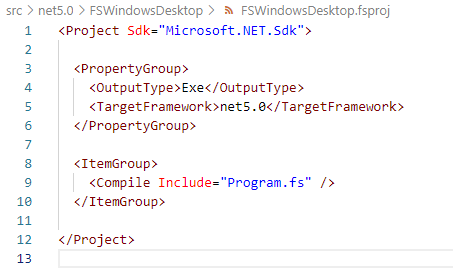
We'll have this fsproj generated:


Change TFM from net5.0 to net5.0-windows, and also change OutputType to WinExe.

The output type change is important, because we have to explicitly tell the project that we have to mark the resulting Exe as Windows executable to run the app for Windows. See also the technical reason about this change since .NET 5.0: https://docs.microsoft.com/en-us/dotnet/core/compatibility/windows-forms/5.0/automatically-infer-winexe-output-type

Open the Program.fs, then copy the content of Program.fs from my previous .NET Core 3.1, then build it using dotnet build: (I name the project to same FSWindowsDesktop)

dotnet build FSWindowsDesktop\FSWindowsDesktop.fsproj

Then run it! Or, you can also compile and run the project using "dotnet run".

Now we're going to update the code to use one of the cool F# 5.0 features, the string interpolation!

Update the program.fs to be like this:


Note line 21, we use string interpolation to represent the name of the field/variable. It is useful, because now we could avoid compile error especially when the field/variable name changed!

I added the size of the mainForm, because we need to see the title of the form changed to include the string interpolation, combined with other new feature of "nameof". Run the code and we will see this WinForms window:


There you have Windows Forms project in F#! 
This time, with demo of string interpolation, and with also a sample of new "nameof" feature to include the name of the variable/module/symbol as string expression.

As always, the full code is available on my GitHub repo: https://github.com/eriawan/netcore-fsharp-sample

Enjoy and celebrate F# Advent 2020 and happy holiday and Merry Christmas, everyone! 


Wednesday, May 20, 2020

Speaking at DevOps Indonesia joint collaboration with MUGI Jakarta: DevOps Indonesia May 2020 online meetup!

Hi my blog audiences!

If you have followed me last year, I have had collaboration with DevOps Indonesia meetup, now this month I have had another good collaboration with DevOps Indonesia.

On 19th May 2020, we collaborate on having joint collaboration, on behalf of DevOps Indonesia! We were having a wonderful teamwork!
This is the meetup link: https://www.meetup.com/DevOps-Indonesia/events/270642522/


I was participating as speaker to represent MUGI Jakarta, and also helping to give feedback on how the meetup should be, because this is MUGI Jakarta and DevOps Indonesia's first online meetup!

Here, we were using Zoom to host about 50 participants:


This is intriguing! Yes, I have had online remote speaking at Louisville meetup, but now I decided to record the video first and ask Mia and Wisnu from DevOps Indonesia to play the video during my session. This is necessary, because I was having unstable internet the day before the meetup.

There were 2 speakers, one is Gopesh Maindola, a Consulting Engineer from Palo Alto Networks, and then me. I'm proudly represent MUGI Jakarta! 😍

On this meetup, I presented "Adopting shift left and sift right in DevOps". I also gave more sample use cases using the proven best practices from Microsoft, the Azure Cloud design patterns and how Microsoft implements DevOps in its own organization.

First, we have opening from DevOps Indonesia. The team, Wisnu and Mia presenting DevOps Indoonesia meetup timeline:


This is me presenting in recorded video::


I gave use cases from Azure Docs page:


And another nice thing is the online meetup was live on Youtube!
You can watch the full session at: https://www.youtube.com/watch?v=OwqdIHlD0eo

Enjoy the recording video and welcome to "new normal"! 😊


Sunday, March 1, 2020

Representing as Microsoft MVP at DevCon Digital Economy Summit

Hi guys!
I'm humbly proud that I have participated at the DevCon Digital Economy Summit 2020 that hosted by Microsoft Indonesia!
This event is held at Ritz Carlton Hotel, Pacific Place, Jakarta.

I was part of MVP Indonesia team that helps Microsoft Indonesia to promote, spread the event information, and also taking care of special MVP Indonesia's booth.


We are sooo honored to have President of Indonesia, HM Joko Widodo and MS CEO, Satya Nadella!


Here's me and fellow MVPs (Andri Yadi), taking care of MS MVP Booth, answering any questions about software development, .NET, and Visual Studio:


And we (Andri Yadi, Agus Suparno, Adiityo) still had some fun taking pictures with MS Asia's Annie Matthew and MS Indonesia's Irving Hutagalung:


Yup, I'm glad that I could provide help for software developer communities thru this conference! 😉


Wednesday, January 22, 2020

Speaking and mentoring on Preparation of your first tech talk at Global Diversity CFP Day 2020 Jakarta

Hi my blog audiences!

Again, this year is a sweet-speaking-busy year! I mean positively busy speaking and sharing what I know but also sharing experiences! Now, I'm also mentoring! Sweeet!

Thanks to offer from Sarah Thiam, Microsoft APAC Developer Relation PM that asking me to help mentoring and speaking for this community meetup, Global Diversity CFP Day!

NOTE: CFP stands for Call For Paper, and it's a common term of open/available opportunity to submit your proposal paper for speaking talks.

To be honest, this is my second speaking about diversity in 2007. At that time I was speaking for small meetup group in Surabaya to empower women developers. This time, I'm not just speaking, I'm mentoring! 😊

Also thanks to Microsoft Indonesia for sharing and supporting its venue for this meetup! I am so grateful, folks!

This was the event announcement: (at https://bit.ly/gdcfpjkt2020)


Not just me, we also had an array of amazing community speakers like Galuh, Kiki, Imre Nagi Adrianti Rusli, Prabu Rangki, Hepiska Pranata.

First, we have opening speech from Kiki and Galuh:


In that photo, Galih explained about common speaking paper submission for call for paper opening. She also explained how to get/search for call for paper opportunity. Great tips!

Then I deliver how to prepare your first tech talk. Put it simply, don't be afraid to start submitting your proposal, guys!


I welcome noobies, of course! Because..


Therefore it's quite similar on how continuous integration and continuous deployment on DevOps works, THERE IS ALWAYS A CONTINUOUS IMPROVEMENTS 😊

I also deliver an analogy while at the same time presenting Azure DevOps conceptually:


Next, Prabu Rangky presented on how to deliver your speech and presentation effectively:


Full of cool tips!

Then we had cool presentation about How to ensure accessibility on your presentation, delivered by Adrianti Rusli:


Last but not least, we had cool presentation on how to do live demo for speaking, by Imre Nagi:


Next step is the real DO, the workshop!

The workshop was so amazing! All of the participants were eager and anxious to start wrting a speaking paper proposal:


Those participants were also encouraged to deliver 5-min talk, to ensure that they are actually doing it 😊

The event final moments are nicely done, we wrapped up in a freestyle photo session in front of Microsoft Indonesia receptionist desk 😉


That's it! 

PS: I always open to be invited for speaking for not just my own community, but also other communities especially for those communities promoting diversity like this!

Sunday, December 22, 2019

[ADVENT 2019] F# Advent 2019: Revisiting Windows Forms and WPF in F# on .NET Core 3.1

Hi my blog readers!

Now it's time for F# Advent 2019! This annual advent showcases F# bloggers and their articles, in December, thanks to Sergey Tihon, a fellow MS MVP. This year, the complete list of F# Advent 2019 is available at: https://sergeytihon.com/2019/11/05/f-advent-calendar-in-english-2019/

I had submitted schedule for 22nd December by replying to his tweet: https://twitter.com/sergey_tihon/status/1191558104506343425

So let me bring you F# on top of .NET Core 3.1, with code that runs Windows Forms (a.k.a. WinForms) and WPF.

Is this possible? The simple answer is YES. Although there's no new template to create WinForms and WPF in "dotnet new".

The list of available templates are shown when we execute "dotnet new -h":


Yes, it's only available for C#:


So how to have these WPF and WinForms using F#?

It is a bit tricky, but thanks to .NET Core 3.0's new ways of referencing "contextual" technology references, we can leverage WPF and WinForms.

Before .NET Core 3.0

Before .NET Core 3.0, we have to use metapackages combined with specific SDK header in the csproj/fsproj/vbproj, and this metapackage combination with SDK are somehow hard to understand.

It is not so obvious that the SDK and the metapackage are not well integrated, because you still have to specify some of the .NET Core libraries to use as nuget package references. This is quite common in ASP.NET Core templates before 3.0.

Let's use the .NET Core 2.2 latest SDK, 2.2.207 to illustrate this.
To ensure that I'm using at least SDK 2.2.207, I use global.json on the solution/project folder to enforce .NET Core to use the SDK version I want, not choosing the latest release of SDK available.

I had created a global.json file with SDK version, by using the "dotnet new global.json --sdk-version 2.2.207" on command prompt.

This is the content of the global.json:

{
  "sdk": {
    "version": "2.2.207"
  }
}

We can test this by running "dotnet --version", and it will give you the version of the SDK as set in the global.json file.

To create an ASP.NET Core MVC web app in .NET Core 2.2, we use this template when creating using "dotnet new". Now let's create new F# ASP.NET Core MVC and named is as FSharpMVC:

dotnet new mvc -n FSharpMVC -lang F#

This is the content  of the FSharpMVC.fsproj file:


And there is a nuget package reference to "Microsoft.AspNetCore.App", and this is a sample of a metapackage.

Also note the use of SDK in the <Project> header:
Sdk="Microsoft.NET.Sdk.Web"

This means that this is generated using ASP.NET Core template. Unfortunately, not all the ASP..NET Core libraries are included in that metapackage. You still have to reference them as nuget package references, and at many times this may get messy.

For example: references to Microsoft.Extensions.Configuration.* are all have to be referenced as nuget packages explicitly, Also before .NET Core 3.0, there's no support for WinForms and WPF.

After .NET Core 3.0

Now we have WinForms and WPF support as port from .NET Framework to .NET Core in .NET Core since 3.0.

In this article, I focus on .NET Core 3.1 because this is the LTS release. The LTS means that this release of 3.1 has long time support compared to 3.0.

On the SDK,, I use .NET Core 3.1.100 SDK at the time of this writing.

To create a new F# project to have WinForms and WPF, I could just use console as template. Because currently no default template support for F# for WinForms and WPF.

We should use global.json to enforce the SDK to be 3.1.100, then create the project, like this:

dotnet new console -n FSWinfowsDesktop -lang F#

By default, console project of F# and C# always have base SDK in the <Project> header.
Now let's look at the content of FSWindowsDesktop:


We can leverage the "FrameworkReference" to have references to .NET Core SDK libraries in a separated contexts as previously described as metapackage before 3.0. This is an often overlooked features, although it is very useful!

The Framework reference in .NET Core 3.0/3.1 describes what libraries we want to use besides the base .NET Core libraries. Using VS 2019 16.3.x or later, the FrameworkReferences is shown nicely as "Frameworks":


The Microsoft.NETCore.App is always referenced by default, because this FrameworkReference is the base .NET Core library.

The available valid FrameworkReferences values are available under the Dotnet installation folder under "Shared" of "Program Files" for 64-bit, or "Program Files (x86)" for 32-bit.


Now let's add the Microsoft.WindowsDesktop.App as FrameworkReference, and also explicitly tell the project to use WinForms using <UseWindowsForms> set to true.

We now have this:


Then we can now leverage the references inside our F# code, using the open namespace and we are also guaranteed to have the namespaces available in the intellisense!


To use WPF, we can use <UseWPF> and set to true.
Also we can have both WPF and WinForms by having both <UseWindowsForms> and <UseWPF> both set to true, as long as we have FrameworkReference to Microsoft.WindowsDesktop.App.

To see this sample as a complete sample with the global.json file, I have made the source code available on my GitHub:
https://github.com/eriawan/netcore-fsharp-sample

And last but not least, Merry Christmas and have a happy F# Advent 2019!

😀

Monday, December 16, 2019

Speaking at Global AI Bootcamp 2019

Hi my blog readers!

This December is surely a surprising month, because December is usually the month that no community event gatherings are held in Jakarta, but there is one!

This time I had speaking engagements at Global AI Bootcamp 2019 meetup and workshop, organized by Buitenzorg Makers Club (BMC) and Dicoding. What a busy community, BMC! Some of you have known Fadhil, BMC lead. And under his lead, BMC has active records of having community meetups for more than 4 times/year!

This is the event link: https://www.dicoding.com/events/2782


NOTE:

  1. The Global AI Bootcamp is an annual global meetup/event, initiated by Microsoft with local event supports. that focused on AI on Azure.
  2. The global event in 2019 is in December, although it is usually on November.

The event was held on DiLo Kemenpora, a community place and also coworking space for meetup,

We have also other speakers: Fadhil himself, Endang Suwarna, Amir Umara.

The event is not just an ordinary seminar/presentation, but it also has workshop as well.

The audiences are not many (around 50) but the enthusiasm is so high! At my speaking time, I got asked a lot of heavy questions about AI.

Here are the scenes/pictures of the audiences:


The audiences are so active!

Here we have Fadhil and his crew delivered opening in a fun way:


Then I continued to present ML .NET:


and Visual Studio 2019 is in action:


On my session, I presented ML.NET with step by step tutorial from Microsoft Docs and from this official landing page of ML.NET: https://dotnet.microsoft.com/apps/machinelearning-ai/ml-dotnet

It is always so easy to learn and follow, because the code samples are also there and it is available on GitHub: https://github.com/dotnet/machinelearning-samples

I mainly focused on ML.NET for sentiment analysis and forecasting, because it is quite simple and it's also easy to train the AI model data, compared to other samples.

Then Fadhil presented his AI+IOT demo:


There were other speakers in session as well but I had to leave soon because I had other things to do after I finished my session and providing help for Fadhil and his session.

But of course we always had photo session 😉


It's a wrap, and I have to admit it was quite intense when answering the audiences questions, but again I'm always happy to contribute back to communities!