Showing posts with label F#. Show all posts

Monday, December 23, 2024

[ADVENT 2024] What's new in F# in .NET 9.0 and .NET 9.0 SDK dotnet restore audit impact

 Hi my blog readers! I'm now back joining the F# Advent tradition! In this Advent 2024, I discuss some of What's new in F# 9..0 in .NET 9.0 only, and the dotnet restore audit behavior in .NET SDK.

I'm sure that we had enjoyed watching dotnetConf 2024 and also as usual, the launch of .NET new release annually, now it is .NET 9.0!

This release has an odd major version, it means a STS release, not the long term as the even major version. This means the .NET 9.0 has short term sipport release. The STS always has 1.5 year support, and the LTS has 3 years of support.

I personally think although it is STS release, this .NET 9.0 is quite important release. Not just it has all of the newer features of almost all languages that comes with .NET (C# and F#, unfortunately VB is not developed anymore since .NET 6.0) but it has many notable breaking changes.

Let's start discussing what's new on F# 9.0 first.

Sunday, December 24, 2023

[ADVENT 2023] Evolving improvement on existing features in the latest F# release in 2023: F# 8.0 (and a surprise)

 Hi my blog readers! Again in this F# Advent 2023, Merry Christmas and happy new year 2023! 😊

Before I discuss the evolving improvements of F#, let's celebrate the release of .NET 8.0 in November this year at dotnetConf 2023! This release has even major version number, means that this is LTS release that is supported for three years since the release.

NOTE about the use of .NET instead of .NET Core: 

If some of you may wonder that I'm not saying ,NET Core 8.0, because Microsoft has removed the "Core" since ,NET 5.0. See also my previous blog at https://fsharpmonologue.blogspot.com/2022/12/advent-2022-whats-new-in-f-7-and-some.html and Microsoft's explanation on why this is just .NET.  This is the last blog that explains why going forward if I discuss .NET 5.0 and later I just use .NET instead of .NET Core.

NOTE about F# 8: F# 8 comes with .NET 8.0 release. Therefore these improvement in F# 8 requires .NET 8.0.

Now, let's discuss what are those improved features in F# 8!

Evolving improvement on F# 8

In this F# Advent, I won't discuss all of new features in F# 8, as all of them has already discussed in this Microsoft blog: https://devblogs.microsoft.com/dotnet/announcing-dotnet-8/ 

What really caught my attention is the way the existing feature evolved: the previous features laid the foundations of the improvement. It is a good thing, as sometimes new features or even improvements may break or even if it may not break sometimes it will create a controversy, as we have seen in C# param bangbang annotation, the "param!!" that now ends up rejected, and the notes of C# LDM meeting about this issue that concludes that this feature is rejected

Let's discuss my own choice of these three feature evolution: F# string interpolation, string literals, numeric literals, and TailCall diagnostic attribute.

F# string interpolation

The F# string interpolation is very useful, and it was introduced in F# 5: Docs on what's new in F# 5

Let's start from a simple usage of this feature, by comparing before and after having string interpolation.

In this example, I print an expression of how many years old Indonesian independence using F# printfn with F# format patterns, before and after F# 5:

sample 1 of string interpolation

As we see, this is very useful and also helpful, in a sense that it simplifies many things, including less use of format patterns. Of course, you can still use the format patterns, like this example from F# docs:


And since F# is strongly typed, this string interpolation combined with format patterns is also strongly typed at compile time. For example, if you mix the format with wrong types you'll get compile error, like this example::


In F# 8, you can use an improvement of having to include the curly braces as part of the string without escaping them, by having extended double dollar signs "$$" instead of just single dollar "$".

This is very convenient when we have a sample to have HTML templating from the blog of F# 8 announcement:


In that sample code, notice that the CSS syntax of curly brace feels more natural in F# 8. This is why I called this evolving feature improvement, instead of introducing new feature that has no or little relation with existing feature!

Here is another sample of F# format patterns combined with string interpolation, this improvement is also amazingly powerful, because the format and the string flow nicely. For example:


String literal improvement

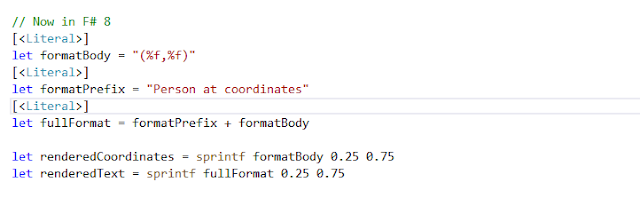
Not just that, the string literal handling is evolved: string literal defined anywhere else can be combined with other string and also format patterns, and also can be used further with printf, sprintf, and other prontf operation. This is also still valid when combined with string interpolation.

For example:

Numeric literals improvement

Numeric literals have been available quite long time, and usually we can only assign a constant value. While we of course can combine these numeric literals with others, in F# 8 the assignment can also contain arithmetic operations. This would be very useful as we could assign calculations of any numeric values as long as the types are correct.

For example (taken from F# code in the announcement of F# 8):


We can now see the evolving of this numeric literals may be minor, but this is very useful indeed. I personally think that this is an added value, and it is similar added value like pervious string literal discussion.

Tailcall diagnostics attribute

We know that we can have recursive functions to be optimized as tailcall functions, especially if the functions meet the conditions to be compiled as recursive functions that has tailcall.

One of the condition is that the function must have accumulator, like the example in F# Tutorial:


Now we could "test" the tailcall. I create the same function with different name and with added TailCall attribute, and then compile it to see if it has warning or not:


There's no warning, and it's a tailcall recursive function. Now if I just use the sample of sum with no tailcall accumulator and mark it, then it give a warning:


Unfortunately, that warning isn't shown in the Visual Studio's Error List pane output:


To see both panes, here it is:


To be honest, this is quite surprising! 

Don't worry, I already submit a bug report: https://github.com/dotnet/fsharp/issues/16467

Monday, December 26, 2022

ADVENT 2022: What's new in F# 7 and some tips (with BenchmarkDotnet)

 Hi my blog audiences! First of all, Merry Christmas for you in this December 2022!

As always, this blog entry in December is part of F# Advent 2022 edition. Thanks Sergey Tihon for tirelessly organizing this F# Advent annually!

As most of you know I often discussing what's new in F# and with the related annual release of .NET. 

NOTES: Now .NET Core is just called .NET, so when I mention .NET this means not .NET Framework, it is .NET Core without Core. See the original Microsoft's official announcement on why.

Before I continue to discuss this F# 7, all of the code/features mentioned here requires Visual Studio 2022 17.4.0 as it is the starting version that provide support for .NET 7.0 SDK. But I strongly recommend to use 17.4.3 and later, because 17.4.3 has many bug fixes and important security fix of CVE-2022-41089 Remote Code Execution .

So what's new in F# 7? Again, there is an official explanation available on Microsoft blog: https://devblogs.microsoft.com/dotnet/announcing-fsharp-7/ and I suggest you to visit that page first.

These are the noticeable new features in F# 7:

  1. Simplified F# SRTP syntax
  2. Static virtual members 
  3. Ability to consume (interop) C# required and init members

And many more as mentioned in the official announcement above.

For this blog entry, I describe static virtual members and consuming C# required and init members.

Static virtual members in F#

The ideas behind this is simple: having static virtual members in interface. As in the blog mentioned, this is needed to consume and also to define static virtual members as those in C#.

    public interface IGetNext where T : IGetNext
    {
        static abstract T operator ++(T other);
    }

For more context, please visit the official doc of this C# 11 feature: https://learn.microsoft.com/dotnet/csharp/whats-new/tutorials/static-virtual-interface-members

That sample is using complex sample of implementing C# ++ operator, and this is not easily consumed in F#, as F# doesn't have increment operators. 


NOTE: there's a question about this C#'s increment implementation in F# as mentioned in Stackoverflow, but this is not semantically the same as in C#.

Therefore, let's try a simpler one: 

    public interface IFinancialMath
    {
        static abstract double CalculateSavingInterest(double saving, double annualInterestRate, double totalYears);
    }

and then we can consume that in F#:


What about we create in F#? To start quickly, we can use the sample in the blog.

But if we are looking at the F# example in the blog, compiling it will yield warning of FS3535:


But we can suppress this warning in the F# project file (the fsproj) instead of using #nowarn, because it is easier to reason about that this fsproj has disabled warning that we are consciously aware.

NOTE: having nowarn as embedded in the code using #nowarn is still useful if you need granular control on the code instead of project scope in fsproj.

For example:

  
  <PropertyGroup>
	<NoWarn>FS3535</NoWarn>
  </PropertyGroup>

And then it is also simpler, and MSBUILD will recognize that NoWarn to be passed to compiler successfully.

Consuming C# required and init members in F#

Consuming C# required and init members in F# is quite easy, as F# can recognize C# classes/records that has required and init.

NOTE: F# doesn't have the same idiomatic feature of C# required semantics, therefore it is not built in F#. It can only consume C# required semantics, not having its own required semantics.

Large part of this feature has been explained by the blog, but I will add my own additional detail here.

The number of C# members that have required mark will always be checked by F# compiler, but this check will always check each one of the required members. The good thing about this F# support for this feature is the fact that the F# compiler will tell you what are the missing required members to be included as part of the constructor call.

For example: if you have a Person class with 3 required property members, then the compiler will check the required members at the time of calling the constructor. Any missing member will be mentioned by the compiler's error message:

The C# init sample is already described nicely in the blog. This may look like a new feature, as it now recognizes init. But it is not just that: it is actually a matter of change of behavior: previous init was handled as mutating the value of the property and now F# 7 compiler will yield an error if there's an init on the getter and others when the setter and getter is used outside the scope of the init.

This will therefore ensure consistent behavior when these C# codes are used in F#, with the correct behavior as intended.

Comparing LINQ improvements in .NET 7 with equal F# using BenchmarkDotnet

Now that we have .NET 7.0 and F# 7, we also have performance improvements in .NET 7.0. One of the nice improvements is some of LINQ methods are now significantly faster!

In this case, we are going to use very useful and also popular benchmark tool in .NET, using BenchmarkDotnet

Contrary to some of some saying that BenchmarkDotnet is only available (supported) by C#, it isn't that case at all. BenchmarkDotnet can be used by F# (and other managed language such as VB.NET) successfully. It is also open source, therefore it is easy to learn and to contribute back to BenchmarkDotnet.

A good case of this in F# is we are checking the perf improvements in .NET 7.0 against equal function in F#, such as LINQ's Max and F# Array.max.

According to the official announcement of Performance improvements in .NET 7.0, one of the improved LINQ method is Max method. 

Now let's compare this with F# Array.max and see the winner!

Before that, I have to prepare a sample benchmark code, then add BenchmarkDotnet nuget package toat leverage the BenchmarkDotnet. This the simplified code:

And this is the result:


So clearly the winner is LINQ's Max()!

This is interesting, because LINQ Max and Min in .NET 7 is now optimized further to use vectorized API of AVX extension, which is very efficient and also faster.

This means there's still some improvement, particularly on F# implementation of Array.max as we have seen in that benchmark result.

NOTE to myself: I think I will propose this to F# official repo as improvement, therefore it should be on a par with ,NET  LINQ's Max and Min implementations. 😊

That's all folks! Merry Christmas and happy New Year of 2023!


Saturday, December 18, 2021

[ADVENT 2021] Initial quick dive into F# 6 task computation expression

 Hi my blog readers!

First, personal announcement related to this blog:

If you follow my blog, you'll see that this blog is not quite often updated. Because many things have changed: Open Live Writer doesn't support Blogger.com anymore, and Blogger.com itself won't accept OAuth/OpenIDConnect anymore. Therefore I'm still searching for new place to blog, hopefully a new at least affordable, less than 80$ annually.

Ok, back to current blog! 

I'm humbly joining the tradition of F# Advent! This 2021, I focus on what's new on F# 6.0, and some additional notes on some of its new features.

New features of F# 6.0

I'm so excited to try F# 6.0! It is also at the same time of the release of Visual Studio 2022 and .NET 6.0!

Here are the interesting and important new features:

  1. The task { .. } computation expression to support general .NET Task (that usually done in C#/VB.NET)
  2. Simpler collection indexing syntax using expr[idx] instead of expr.[idx]
  3. Struct representations for partial active patterns (new attribute to have marking of partial active pattern as struct)

And others new features

  1. Overloaded custom operations in computation expressions
  2. "as" patterns
  3. Increased consistency of indentation and undentation in code
  4. Additional implicit conversions
  5. New number format for binary 

and many more! For more complete list, visit Microsoft F# Docs: 

https://docs.microsoft.com/en-us/dotnet/fsharp/whats-new/fsharp-6

Now let's visit F# task computation expression.

F# task computation expression

NOTE: I might be biased, but this new task computation expression is the most important, because it brings closer compatibility with async-task based programming in C# and VB.

We all know that F# already has async computation expression. This existing async computation expression also has convenient functions to interop with Task, such as F#'s Async.StartAsTask:

https://fsharp.github.io/fsharp-core-docs/reference/fsharp-control-fsharpasync.html#StartAsTask

The task computation exprerssion is better than the existing F# async computation when interop with Task not just the faster performance and easier debugging, but the interop is easier.

The term easier is actually translated as closer compatibility with Task. Why? Let's see the sample code in the Docs:


let readFilesTask (path1, path2) =
   task {
        let! bytes1 = File.ReadAllBytesAsync(path1)
        let! bytes2 = File.ReadAllBytesAsync(path2)
        return Array.append bytes1 bytes2
   }

We now can call those async API like File.ReadAllBytesAsync(path1) with implicit await by having let! on the returning result.

To see what really happened, the task computation expression comes as TaskBuilder. This builder will generate the necessary IL within the task expression.

Let's see the generated C# decompiler: (I use free JetBrains DotPeek 2021.3)


We could see the similar pattern of C# async in that readFilesTask method  by observing the similar pattern of async state machine.

Then the IL goes further to return task, as in this generated IL method of readFilesTask that returns the Task:

  .method public static class [System.Runtime]System.Threading.Tasks.Task`1
    readFilesTask(
      string path1,
      string path2
    ) cil managed
  {
    .maxstack 4
    .locals init (
      [0] valuetype FSharp6NewFeatures.Say/readFilesTask@11 readFilesTask11,
      [1] valuetype FSharp6NewFeatures.Say/readFilesTask@11& local
    )

    // [23 7 - 23 82]
    IL_0000: ldloca.s     readFilesTask11
    IL_0002: initobj      FSharp6NewFeatures.Say/readFilesTask@11

    // [24 7 - 24 64]
    IL_0008: ldloca.s     readFilesTask11
    IL_000a: stloc.1      // local

    // [26 7 - 26 26]
    IL_000b: ldloc.1      // local
    IL_000c: ldarg.1      // path2
    IL_000d: stfld        string FSharp6NewFeatures.Say/readFilesTask@11::path2

    // [28 7 - 28 26]
    IL_0012: ldloc.1      // local
    IL_0013: ldarg.0      // path1
    IL_0014: stfld        string FSharp6NewFeatures.Say/readFilesTask@11::path1

    // [30 7 - 30 73]
    IL_0019: ldloc.1      // local
    IL_001a: ldflda       valuetype [FSharp.Core]Microsoft.FSharp.Control.TaskStateMachineData`1 FSharp6NewFeatures.Say/readFilesTask@11::Data
    IL_001f: call         valuetype [System.Runtime]System.Runtime.CompilerServices.AsyncTaskMethodBuilder`1 valuetype [System.Runtime]System.Runtime.CompilerServices.AsyncTaskMethodBuilder`1::Create()
    IL_0024: stfld        valuetype [System.Runtime]System.Runtime.CompilerServices.AsyncTaskMethodBuilder`1 valuetype [FSharp.Core]Microsoft.FSharp.Control.TaskStateMachineData`1::MethodBuilder

    // [32 7 - 32 75]
    IL_0029: ldloc.1      // local
    IL_002a: ldflda       valuetype [FSharp.Core]Microsoft.FSharp.Control.TaskStateMachineData`1 FSharp6NewFeatures.Say/readFilesTask@11::Data
    IL_002f: ldflda       valuetype [System.Runtime]System.Runtime.CompilerServices.AsyncTaskMethodBuilder`1 valuetype [FSharp.Core]Microsoft.FSharp.Control.TaskStateMachineData`1::MethodBuilder
    IL_0034: ldloc.1      // local
    IL_0035: call         instance void valuetype [System.Runtime]System.Runtime.CompilerServices.AsyncTaskMethodBuilder`1::Start(!!0/*valuetype FSharp6NewFeatures.Say/readFilesTask@11*/&)

    // [34 7 - 34 44]
    IL_003a: ldloc.1      // local
    IL_003b: ldflda       valuetype [FSharp.Core]Microsoft.FSharp.Control.TaskStateMachineData`1 FSharp6NewFeatures.Say/readFilesTask@11::Data
    IL_0040: ldflda       valuetype [System.Runtime]System.Runtime.CompilerServices.AsyncTaskMethodBuilder`1 valuetype [FSharp.Core]Microsoft.FSharp.Control.TaskStateMachineData`1::MethodBuilder
    IL_0045: call         instance class [System.Runtime]System.Threading.Tasks.Task`1 valuetype [System.Runtime]System.Runtime.CompilerServices.AsyncTaskMethodBuilder`1::get_Task()
    IL_004a: ret

  } // end of method Say::readFilesTask

Now that we can observe the generated IL after compiling the F# sample, that F# code sample is roughly (semantically) equivalent to this C#:

        public static async Task ReadFilesTask(string path1, string path2)
        {
            var bytes1 = await File.ReadAllBytesAsync(path1);
            var bytes2 = await File.ReadAllBytesAsync(path2);
            var bytes3 = new Byte[bytes1.Length + bytes2.Length];
            // Equivalent logic for F# Array.append
            for (int i = 0; i < bytes1.Length; i++)
                bytes3[i] = bytes1[i];
            for (int i = 0; i < bytes2.Length; i++)
                bytes3[bytes1.Length + i] = bytes2[i];
            return bytes3;
        }

As we see now, it is closer to what C# async has, and this feature also remove barrier to have close compatibility between F# and C# async. 

NOTE: thanks to vibrant F# users, in this first release of F# 6, there is still a bug: any call to Array.map will have undesired exception. The GitHub issue for this bug is available and the merged PR to fix this is also available!

Based on the current progress of that fix, this fix will be available in the upcoming release of .NET 6.0.200 at the same time with VS 2022 17.1.0 release.

But what if you want to use it now? We could just use Don Syme's temporary workaround available on that GitHub issue of that bug.

What are you waiting for? Let's start to code with F# 6.0 now, F# folks! And Merry Christmas and happy holiday! ❤️


Saturday, December 12, 2020

[ADVENT 2020] F# Advent 2020: Revisiting Windows Forms and WPF in .NET 5.0 and hello F# 5.0

 Hi my blog readers!

This year, we have lots of exciting news on .NET Core land: the release of .NET 5.0 and also the release of new language version of F# and C#!

Last year, I discuss about how to write F# code with project support for Windows Forms/WPF in .NET Core 3.1. Also I'll showcase simple sample of latest new F# 5.0 features. What about .NET 5.0?

PS: .NET 5.0 is not .NET Framework. It is actually .NET Core version 5.0, and Microsoft describe as no "Core" branding from .NET 5.0 going forward. See also https://docs.microsoft.com/en-us/dotnet/core/dotnet-five#net-50-doesnt-replace-net-framework

In .NET 5.0, the TFM can be explicitly stated to support the underlying OS. Current .NET Core 3.1 has no TFM with OS directly (so does previous version before 3.1.

This means that in .NET 5.0 and later we should not use .NET Core Windows desktop SDK support like we have in .NET Core 3.1 and 3.0. 

As always, since .NET Core 3.0 and until 5.0, there's no default project template support to create Windows Forms/WPF project using F#. However, we can still code Windows Forms/WPF using the same way we use in my previous F# Advent 2019 blog. Again, with a twist of .NET 5.0 feature 😊

Now let's look at how the current .NET 5.0 create WinForms/WPF project from dotnet CLI.

To create a new winforms app project in .NET 5.0, we can use the same template in 3.1 like this example:

dotnet new winforms -n CSNet50Winforms

Let's look at the generated C# project: 

<Project Sdk="Microsoft.NET.Sdk">

  <PropertyGroup>
    <OutputType>WinExe</OutputType>
    <TargetFramework>net5.0-windows</TargetFramework>
    <UseWindowsForms>true</UseWindowsForms>
  </PropertyGroup>

</Project>

We can see we have two noticeable features:

  1. We can just use default "Microsoft.NET.Sdk" SDK
  2. TFM is set to .NET 5.0 with Windows

Now we apply this to F# project, with the same model of SDK and the TFM as above. The fact is that this SDK project model alongside with TFM is actually not enforcing programming language support, because although Winforms and WPF provides C# and VB support, we can also use the same SDK for F# as well.

Let's start create new console project using F#, and name it FSWindowsDesktop using dotnet CLI:

dotnet new console -n FSWindowsDesktop -lang F#

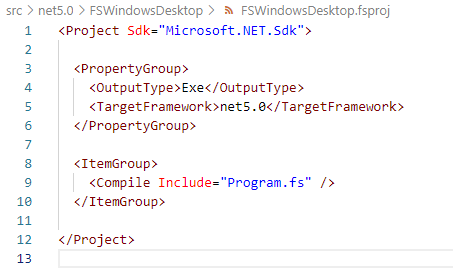
We'll have this fsproj generated:


Change TFM from net5.0 to net5.0-windows, and also change OutputType to WinExe.

The output type change is important, because we have to explicitly tell the project that we have to mark the resulting Exe as Windows executable to run the app for Windows. See also the technical reason about this change since .NET 5.0: https://docs.microsoft.com/en-us/dotnet/core/compatibility/windows-forms/5.0/automatically-infer-winexe-output-type

Open the Program.fs, then copy the content of Program.fs from my previous .NET Core 3.1, then build it using dotnet build: (I name the project to same FSWindowsDesktop)

dotnet build FSWindowsDesktop\FSWindowsDesktop.fsproj

Then run it! Or, you can also compile and run the project using "dotnet run".

Now we're going to update the code to use one of the cool F# 5.0 features, the string interpolation!

Update the program.fs to be like this:


Note line 21, we use string interpolation to represent the name of the field/variable. It is useful, because now we could avoid compile error especially when the field/variable name changed!

I added the size of the mainForm, because we need to see the title of the form changed to include the string interpolation, combined with other new feature of "nameof". Run the code and we will see this WinForms window:


There you have Windows Forms project in F#! 
This time, with demo of string interpolation, and with also a sample of new "nameof" feature to include the name of the variable/module/symbol as string expression.

As always, the full code is available on my GitHub repo: https://github.com/eriawan/netcore-fsharp-sample

Enjoy and celebrate F# Advent 2020 and happy holiday and Merry Christmas, everyone! 


Sunday, December 22, 2019

[ADVENT 2019] F# Advent 2019: Revisiting Windows Forms and WPF in F# on .NET Core 3.1

Hi my blog readers!

Now it's time for F# Advent 2019! This annual advent showcases F# bloggers and their articles, in December, thanks to Sergey Tihon, a fellow MS MVP. This year, the complete list of F# Advent 2019 is available at: https://sergeytihon.com/2019/11/05/f-advent-calendar-in-english-2019/

I had submitted schedule for 22nd December by replying to his tweet: https://twitter.com/sergey_tihon/status/1191558104506343425

So let me bring you F# on top of .NET Core 3.1, with code that runs Windows Forms (a.k.a. WinForms) and WPF.

Is this possible? The simple answer is YES. Although there's no new template to create WinForms and WPF in "dotnet new".

The list of available templates are shown when we execute "dotnet new -h":


Yes, it's only available for C#:


So how to have these WPF and WinForms using F#?

It is a bit tricky, but thanks to .NET Core 3.0's new ways of referencing "contextual" technology references, we can leverage WPF and WinForms.

Before .NET Core 3.0

Before .NET Core 3.0, we have to use metapackages combined with specific SDK header in the csproj/fsproj/vbproj, and this metapackage combination with SDK are somehow hard to understand.

It is not so obvious that the SDK and the metapackage are not well integrated, because you still have to specify some of the .NET Core libraries to use as nuget package references. This is quite common in ASP.NET Core templates before 3.0.

Let's use the .NET Core 2.2 latest SDK, 2.2.207 to illustrate this.
To ensure that I'm using at least SDK 2.2.207, I use global.json on the solution/project folder to enforce .NET Core to use the SDK version I want, not choosing the latest release of SDK available.

I had created a global.json file with SDK version, by using the "dotnet new global.json --sdk-version 2.2.207" on command prompt.

This is the content of the global.json:

{
  "sdk": {
    "version": "2.2.207"
  }
}

We can test this by running "dotnet --version", and it will give you the version of the SDK as set in the global.json file.

To create an ASP.NET Core MVC web app in .NET Core 2.2, we use this template when creating using "dotnet new". Now let's create new F# ASP.NET Core MVC and named is as FSharpMVC:

dotnet new mvc -n FSharpMVC -lang F#

This is the content  of the FSharpMVC.fsproj file:


And there is a nuget package reference to "Microsoft.AspNetCore.App", and this is a sample of a metapackage.

Also note the use of SDK in the <Project> header:
Sdk="Microsoft.NET.Sdk.Web"

This means that this is generated using ASP.NET Core template. Unfortunately, not all the ASP..NET Core libraries are included in that metapackage. You still have to reference them as nuget package references, and at many times this may get messy.

For example: references to Microsoft.Extensions.Configuration.* are all have to be referenced as nuget packages explicitly, Also before .NET Core 3.0, there's no support for WinForms and WPF.

After .NET Core 3.0

Now we have WinForms and WPF support as port from .NET Framework to .NET Core in .NET Core since 3.0.

In this article, I focus on .NET Core 3.1 because this is the LTS release. The LTS means that this release of 3.1 has long time support compared to 3.0.

On the SDK,, I use .NET Core 3.1.100 SDK at the time of this writing.

To create a new F# project to have WinForms and WPF, I could just use console as template. Because currently no default template support for F# for WinForms and WPF.

We should use global.json to enforce the SDK to be 3.1.100, then create the project, like this:

dotnet new console -n FSWinfowsDesktop -lang F#

By default, console project of F# and C# always have base SDK in the <Project> header.
Now let's look at the content of FSWindowsDesktop:


We can leverage the "FrameworkReference" to have references to .NET Core SDK libraries in a separated contexts as previously described as metapackage before 3.0. This is an often overlooked features, although it is very useful!

The Framework reference in .NET Core 3.0/3.1 describes what libraries we want to use besides the base .NET Core libraries. Using VS 2019 16.3.x or later, the FrameworkReferences is shown nicely as "Frameworks":


The Microsoft.NETCore.App is always referenced by default, because this FrameworkReference is the base .NET Core library.

The available valid FrameworkReferences values are available under the Dotnet installation folder under "Shared" of "Program Files" for 64-bit, or "Program Files (x86)" for 32-bit.


Now let's add the Microsoft.WindowsDesktop.App as FrameworkReference, and also explicitly tell the project to use WinForms using <UseWindowsForms> set to true.

We now have this:


Then we can now leverage the references inside our F# code, using the open namespace and we are also guaranteed to have the namespaces available in the intellisense!


To use WPF, we can use <UseWPF> and set to true.
Also we can have both WPF and WinForms by having both <UseWindowsForms> and <UseWPF> both set to true, as long as we have FrameworkReference to Microsoft.WindowsDesktop.App.

To see this sample as a complete sample with the global.json file, I have made the source code available on my GitHub:
https://github.com/eriawan/netcore-fsharp-sample

And last but not least, Merry Christmas and have a happy F# Advent 2019!

😀

Saturday, December 22, 2018

[ADVENT 2018] Current state of F# 4.x tooling and IDE ecosystem on December 2017

Hi my dear blog readers!

First of all, happy holidays! Now I’m back to joining Sergey Tihon’s  F# advent blog 2018 gathering! Smile


My past 2017 advent blog is available here: https://fsharpmonologue.blogspot.com/2017/12/advent-2017-current-state-of-f-4x.html

In this blog entry, I bring you the states of F# news and updates in two major subtopics: the tooling ecosystem, and the community surroundings.

F# state in December 2018


A lot has happened in 2018, particularly the progress that has been made from Microsoft, F# communities, and the whole cool participations on F# github repo.

To increase clarity, let’s start discussing F# tooling ecosystem.

F# tooling ecosystem updates

The F# tooling is basically evolved since 2005 (as research project before integrated in Visual Studio) into these components:

  1. F# Language Specification
  2. F# Compiler
  3. F# Core libraries
  4. F# Compiler Services (since 2013)

Note that although F# Compiler Services derives from F# Compiler, the F# Compiler Services is very important. Because it brings parity with Roslyn as compiler service. It is also a good sample of having the compiler created with the language you want to compile.

Thanks to its flexibility and power, F# Compiler Services can be used as true component, and it is suitable to be used as language services.

Ionide use F# Compiler Services heavily to provide F# support in Visual Studio Code, and it enjoys many features available in Visual Studio.

Now in Visual Studio 2017 from 15.6, these are the noteworthy F# updates:

  1. Versioning model has been changed to decouple from Visual Studio version releases. This brings F# tooling more freedom and flexibility to progress further, although F# tooling is closely related to a VS release, as described in this RFC of F# versioning plan on GitHub. A follow up article by Phillip Carter brings more detail that VS 2017 15.7.x has F# 4.4, and 15.8.x has F# 4.5, like the captured table below. Note: there will be no 4.2, 4.3 version, it will be version 4.5 or later.
  2. Related to previous point, VS 2017 15.7 will have F# 4.5. And this version will be the same version as F# Compiler Service related iteration.
  3. F# supports the same semantic of ValueTuple as Struct tuple (since 15.6). This brings closer compatibility with the .NET class library of ValueTuple in .NET Framework 4.7.
  4. F# supports full file ordering for .NET Core 2.0 or later project (since 15.6)
  5. Realtime multi TFM targeting (a.k.a. multi targeting in .NET team blog, since 15.6). This brings unique experience compared to other language tooling such as C#/VB, because C#/VB doesn’t have this yet!
  6. Go to definition from the member tooltip (since 15.6)
  7. Removal of dependency to Windows 10 SDK (since 15.6). This brings less size and leaner requirement to have F# development.
  8. ..and many more in 15.6! For more detail, please visit this official blog post: https://blogs.msdn.microsoft.com/dotnet/2018/03/06/f-language-and-tools-update-for-visual-studio-2017-version-15-6/

This is the versioning illustration:

image

This is nicely documented as RFC in F# Language Design repo in https://github.com/fsharp/fslang-design/blob/master/tooling/FST-1004-versioning-plan.md

In 15.7, F# tooling keeps updated too. These are the noticeable updates:

  1. New F# template for ASP.NET Core 2.0 project! This is a very amazing progress since 15.5, because now we could create ASP.NET Core using F# Open-mouthed smile
  2. Enabled generating F# AssemblyInfo from properties with the F# compiler in the .NET SDK. This is not trivial but it is closer to C#/VB feature to support common AssemblyInfo infrastructure that common in C#/VB project.

A quick hands-on sample to use F# new ASP.NET Core template is by executing “dotnet new web –lang f#” like this illustration: (I run against .NET Core 3.0 Preview 1)

image

Now let’s see what’s inside this folder:

image

Looking at the content of Program.fs, we now see that we have the same quick start from C# template:

image

This code implies that we use Kestrel by default.

To be maximally applicable to use F# with ASP.NET Core, I recommend to use Visual Studio Code 1.28 with the updated Ionide.

Now, the other wonderful things happened since July 2018 are the updates from communities!

Bonus fun fact of Microsoft F# repo: it uses Azure DevOps since June as the main CIs!

image


F# community tooling update

These are the best updates from community so far:

  1. Paket now supports .NET Core 2.2 and .NET Core 3.0 as one of its TFM support since 5.181.0.
  2. Fable is reaching version 2.1, and it has tons of bug fixes

That’s it folks!!

Happy holiday and Merry Christmas!

Sunday, September 30, 2018

Speaking at dotnetConf Indonesia 2018

HI there, my blog audiences!
After watching full sessions of dotnet Conf on Channel9: https://channel9.msdn.com/Events/dotnetConf/2018
Now we have dotnetConf in Indonesia!
This event is held on 29th September
But to be honest, the dotnetConf Indonesia is not a complete relay, it’s within the same spirit of the dotnetConf itself: celebrating .NET world as we know and use extensively, especially on using .NET Core on your dev machine, cloud, and on mobile/any devices!
Thanks to Dicoding (https://www.dicoding.com) and Buitenzorg Maker Club (Bogor’s IOT community) to co-host and also promote this event, we have gathered around 100+ attendances!
dotnetconf2018_dicoding_poster
So in this event, we focus on .NET ecosystem and also its application, such as Blockchain using Nethereum, an open source implementation of Ethereum using C# and .NET Core.
I speak on having gentle intro on .NET Core 2.1, and currently at version 2.1.4 (and the related SDK version is 2.1.402).
I also have demonstrated how easy to develop and also at the same time have CI for free using Azure DevOps, as long as it’s open source projects Smile
The demo also focus on the fact that we can code in C#, F#, VB.NET on .NET Core!
.NET Core, although it is quite new, it is a true cross platform of .NET. It is not the same as .NET Framework that only runs on Windows.
Although .NET Core has about 80% API compatibility (except of course excluding Windows-specific API such as WPF, Windows Forms, and Workflow), some of the namespaces haven’t been ported yet.
Some namespaces that needs more works are the parity in System.Data, System.Data.Common, and some inconsistent detail on .NET Framework HttpContext and comparable .NET Core HttpContext.
I gave demo and also gentle intro on .NET Core 2.1, but from the feedback on the audiences, I had to give intro on .NET Core first then .NET Core 2.1.
This is not surprising, because most companies in Jakarta that uses .NET don’t know much or even somehow don’t care much about .NET Core.
We have always hoped that this event will bring more awareness that there is .NET Core, a truly cross platform of .NET and it is also performant!
Here’s the pictures from the event:
dotnetconf_eriawan_00
dotnetconf_eriawan_01
dotnetconf_2018_speaker_namecard
I gave the swag of this event:
dotnetconf_eriawan_02
Here’s Fuad giving presentation on DevOps in general:
dotnetconf_fuad_devops_01
And this is some of the speakers including me:
dotnetconf_speakers_01
From left to right: Puja (MVP), me, Marsya (MS Indonesia), and Fadhil (MVP)
Due to the fact that many of the audiences and also developer communities in Jakarta have asked me to provide blog to track .NET Core, I will spin off a new blog that’s specific to .NET Framework and .NET Core interop!
Watch this blog for the announcement Smile

Sunday, December 10, 2017

[ADVENT 2017] Current state of F# 4.x tooling and IDE ecosystem on December 2017

Hi my dear blog readers!

Thanks to Sergey Tihon for organizing this community-driven advent blog gathering in this year-end of 2017!

sergey_tihon_advent2017

So here we are, on the edge of 2017. There are lots of advances in F# toolings and ecosystem, including the nature of open source ecosystem that has been available since the beginning of F# in VS 2010. When I say F# toolings. I’m not limiting myself to F# tooling in Visual Studio. Toolings in my context is tooling in Visual Studio, Visual Studio Code, and new contender/competitor of Visual Studio IDE, Jetbrains Rider.

F# state

Most advances in F# itself are without IDE. These are the current state of F# itself:

  1. F# supports .NET Core 2.0/.NET Standard 2.0 TFM development. This is also in sync with tooling support, starting with VS 2017 15.5.0, but I suggest you to install 15.5.1 update. (Please read my notes below)
  2. F# implements async interop with C#/VB async correctly, especially those xxxTask function such as Async.StartAsTask. See https://www.visualstudio.com/en-us/news/releasenotes/vs2017-relnotes#fsharp
  3. F# now supports goto definition correctly. I know this is quite IDE-related, but it needs some reworks on existing F# compiler. Thanks to relentless community support of F# contributors, especially Saul and Vasily Kirichenko. These are the PRs related to “go to definition” works: https://github.com/Microsoft/visualfsharp/pulls?q=is%3Apr+%22go+to+definition%22+is%3Aclosed 
  4. Also now goto definition can go from F# to C#/VB.

Now, at F# IDE support:

  1. Ionide (Visual Studio Code extension for F#) gets nice updates! One of the notable feature is automatic project reloading, especially when dealing with F#/.NET Core 2.0 project. This is the latest release notes of Ionide: https://github.com/ionide/ionide-vscode-fsharp/blob/master/RELEASE_NOTES.md
  2. Jetbrains Rider (visual Studio competitor) has provided support for F#. Still, many works need to be done in .NET Core 2.0 full support. Read the original announcement of F# support here: https://blog.jetbrains.com/dotnet/2017/05/08/rider-is-now-also-an-fsharp-ide-adding-fsharp-support/
  3. In Visual Studio 2017 15.5.0: on the installation of a Workload that requires .NET Core 2.0, it will also install F# language support by default. The .NET Core, ASP.NET, and Azure workloads now do this.

Therefore, if you use Visual Studio 2017, it is highly recommended to update or directly use at least 15.5.0 update instead.

NOTE on Visual Studio 2017 15.5.0:

There’s one catch: if you use Xamarin in your worload, the 15.5.0 update on previous version will somehow override Xamarin MonoDroid VSIX packages. Fortunately, on 7th December, there is a fresh maintenance update on 15.5.0, the 15.5.1. This 15.5.1 provides the Xamarin package issue.

Now let’s meet F# and .NET Core using command prompt and in Visual Studio!


F# <3 .NET Core

Now, let’s try F# support for .NET Core.

We could check F# support availability as template, within the .NET Core tool of dotnet.

Using dotnet’s CLI tool, we can display list of templates installed in our .NET Core 2.0 SDK by using new command (parameter that acts as command to execute further) with –l for parameter of new:

dotnet new –l

On .NET Core SDK 2.0.3, run the dotnet above and we will have this list:

dotnet_sdk_203_new

Let’s just focus on Short Name and the Language section on the list:

dotnet_sdk_203_new_languages

So we can compose and create any kinds of project that has F# as language support. The Short Name will be used as new parameter to define what template we’re going to use, the language parameter define the used language.

For example, we can create .NET Core console app with F#:

dotnet new console -n HelloFSharp -lang F#

NOTE: we should use -name parameter to give name to our project, instead of having default name from the template.

Run that in command prompt, we will have the creation of F# .NET Core 2.0 console project:

dotnet_new_console_fsharp

Now let’s look at the content of Program.fs:


// Learn more about F# at http://fsharp.org

open System

[]
let main argv =
    printfn "Hello World from F#!"
    0 // return an integer exit code

Yes, it’s the same as our good old .NET Framework’s F# Console template from VS 2010/2012/2013/2015!

Then we can run it:

dotnet_run_fsharp

We can also provide more granular TFM as the target framework, but this option is only available for classlib template, not for console project template.

For more information, please visit dotnet new docs page: https://docs.microsoft.com/en-us/dotnet/core/tools/dotnet-new?tabs=netcore2x

What about Visual Studio 2017?

In Visual Studio 2017 starting from 15.5.0, we now have this:

VS2017_FS_template

YES! We now have F# .NET Core 2.0 fsproj support within Visual Studio 2017!

What are you waiting for? Go code in F# now!