Showing posts with label .NET Core. Show all posts

Friday, March 8, 2024

Speaking at DotnetConf 2023 on 28th February 2024, organized by MUGI Bogor

 Hi my readers! This time I spoke at one of .NET themed event, the DotnetConf 2023, on 28th February 2024. I was asked by Fadhil, he is ex-MVP and also a community leader of MUGI Bogor and Buitenzorg (IOT maker community).

Thanks to Microsoft Indonesia for let us borrow some space for the meetup!


This .NET Conf (or DotnetConf) is in sync with annual .NET Conf from Microsoft, and we are always celebrating annual new major release of .NET since .NET 5.0!

Yes, .NET since .NET 5.0 will always have major release annually, with emphasize on both LTS on even version number and STS on odd version number, see also this official blogpost from Microsoft:
https://devblogs.microsoft.com/dotnet/introducing-net-5/ 

Pictures of the event and my presentation

I deliver presentation on What's new in C# 12 in .NET 8.0, using Visual Studio 2022 with .NET 8.0 202 SDK, and I enjoyed the audience attention so much because of the questions that keep coming at me :)

My session is not the first one, so I have got the chance to have pictures with Fadhil and Andik Susilo (the one that presents Monitoring Your Application with AppInsight)


Here's the pic: 


In .NET and C#, language advances are not so aggressive, because language advances must align with .NET CLR, and this is a good practice as .NET has known for its support for multiple programming languages, not just C#.

Yes, I have a demo with solution and projects, here it is the repo:
https://github.com/eriawan/eriawan-speaking-show-materials 

The notable feature is the C# primary constructors. which is taken inspiration from F#.


Here it is the F# counterpart:

Further code sample are also available on my repo.

Happy coding! 


Saturday, December 18, 2021

[ADVENT 2021] Initial quick dive into F# 6 task computation expression

 Hi my blog readers!

First, personal announcement related to this blog:

If you follow my blog, you'll see that this blog is not quite often updated. Because many things have changed: Open Live Writer doesn't support Blogger.com anymore, and Blogger.com itself won't accept OAuth/OpenIDConnect anymore. Therefore I'm still searching for new place to blog, hopefully a new at least affordable, less than 80$ annually.

Ok, back to current blog! 

I'm humbly joining the tradition of F# Advent! This 2021, I focus on what's new on F# 6.0, and some additional notes on some of its new features.

New features of F# 6.0

I'm so excited to try F# 6.0! It is also at the same time of the release of Visual Studio 2022 and .NET 6.0!

Here are the interesting and important new features:

  1. The task { .. } computation expression to support general .NET Task (that usually done in C#/VB.NET)
  2. Simpler collection indexing syntax using expr[idx] instead of expr.[idx]
  3. Struct representations for partial active patterns (new attribute to have marking of partial active pattern as struct)

And others new features

  1. Overloaded custom operations in computation expressions
  2. "as" patterns
  3. Increased consistency of indentation and undentation in code
  4. Additional implicit conversions
  5. New number format for binary 

and many more! For more complete list, visit Microsoft F# Docs: 

https://docs.microsoft.com/en-us/dotnet/fsharp/whats-new/fsharp-6

Now let's visit F# task computation expression.

F# task computation expression

NOTE: I might be biased, but this new task computation expression is the most important, because it brings closer compatibility with async-task based programming in C# and VB.

We all know that F# already has async computation expression. This existing async computation expression also has convenient functions to interop with Task, such as F#'s Async.StartAsTask:

https://fsharp.github.io/fsharp-core-docs/reference/fsharp-control-fsharpasync.html#StartAsTask

The task computation exprerssion is better than the existing F# async computation when interop with Task not just the faster performance and easier debugging, but the interop is easier.

The term easier is actually translated as closer compatibility with Task. Why? Let's see the sample code in the Docs:


let readFilesTask (path1, path2) =
   task {
        let! bytes1 = File.ReadAllBytesAsync(path1)
        let! bytes2 = File.ReadAllBytesAsync(path2)
        return Array.append bytes1 bytes2
   }

We now can call those async API like File.ReadAllBytesAsync(path1) with implicit await by having let! on the returning result.

To see what really happened, the task computation expression comes as TaskBuilder. This builder will generate the necessary IL within the task expression.

Let's see the generated C# decompiler: (I use free JetBrains DotPeek 2021.3)


We could see the similar pattern of C# async in that readFilesTask method  by observing the similar pattern of async state machine.

Then the IL goes further to return task, as in this generated IL method of readFilesTask that returns the Task:

  .method public static class [System.Runtime]System.Threading.Tasks.Task`1
    readFilesTask(
      string path1,
      string path2
    ) cil managed
  {
    .maxstack 4
    .locals init (
      [0] valuetype FSharp6NewFeatures.Say/readFilesTask@11 readFilesTask11,
      [1] valuetype FSharp6NewFeatures.Say/readFilesTask@11& local
    )

    // [23 7 - 23 82]
    IL_0000: ldloca.s     readFilesTask11
    IL_0002: initobj      FSharp6NewFeatures.Say/readFilesTask@11

    // [24 7 - 24 64]
    IL_0008: ldloca.s     readFilesTask11
    IL_000a: stloc.1      // local

    // [26 7 - 26 26]
    IL_000b: ldloc.1      // local
    IL_000c: ldarg.1      // path2
    IL_000d: stfld        string FSharp6NewFeatures.Say/readFilesTask@11::path2

    // [28 7 - 28 26]
    IL_0012: ldloc.1      // local
    IL_0013: ldarg.0      // path1
    IL_0014: stfld        string FSharp6NewFeatures.Say/readFilesTask@11::path1

    // [30 7 - 30 73]
    IL_0019: ldloc.1      // local
    IL_001a: ldflda       valuetype [FSharp.Core]Microsoft.FSharp.Control.TaskStateMachineData`1 FSharp6NewFeatures.Say/readFilesTask@11::Data
    IL_001f: call         valuetype [System.Runtime]System.Runtime.CompilerServices.AsyncTaskMethodBuilder`1 valuetype [System.Runtime]System.Runtime.CompilerServices.AsyncTaskMethodBuilder`1::Create()
    IL_0024: stfld        valuetype [System.Runtime]System.Runtime.CompilerServices.AsyncTaskMethodBuilder`1 valuetype [FSharp.Core]Microsoft.FSharp.Control.TaskStateMachineData`1::MethodBuilder

    // [32 7 - 32 75]
    IL_0029: ldloc.1      // local
    IL_002a: ldflda       valuetype [FSharp.Core]Microsoft.FSharp.Control.TaskStateMachineData`1 FSharp6NewFeatures.Say/readFilesTask@11::Data
    IL_002f: ldflda       valuetype [System.Runtime]System.Runtime.CompilerServices.AsyncTaskMethodBuilder`1 valuetype [FSharp.Core]Microsoft.FSharp.Control.TaskStateMachineData`1::MethodBuilder
    IL_0034: ldloc.1      // local
    IL_0035: call         instance void valuetype [System.Runtime]System.Runtime.CompilerServices.AsyncTaskMethodBuilder`1::Start(!!0/*valuetype FSharp6NewFeatures.Say/readFilesTask@11*/&)

    // [34 7 - 34 44]
    IL_003a: ldloc.1      // local
    IL_003b: ldflda       valuetype [FSharp.Core]Microsoft.FSharp.Control.TaskStateMachineData`1 FSharp6NewFeatures.Say/readFilesTask@11::Data
    IL_0040: ldflda       valuetype [System.Runtime]System.Runtime.CompilerServices.AsyncTaskMethodBuilder`1 valuetype [FSharp.Core]Microsoft.FSharp.Control.TaskStateMachineData`1::MethodBuilder
    IL_0045: call         instance class [System.Runtime]System.Threading.Tasks.Task`1 valuetype [System.Runtime]System.Runtime.CompilerServices.AsyncTaskMethodBuilder`1::get_Task()
    IL_004a: ret

  } // end of method Say::readFilesTask

Now that we can observe the generated IL after compiling the F# sample, that F# code sample is roughly (semantically) equivalent to this C#:

        public static async Task ReadFilesTask(string path1, string path2)
        {
            var bytes1 = await File.ReadAllBytesAsync(path1);
            var bytes2 = await File.ReadAllBytesAsync(path2);
            var bytes3 = new Byte[bytes1.Length + bytes2.Length];
            // Equivalent logic for F# Array.append
            for (int i = 0; i < bytes1.Length; i++)
                bytes3[i] = bytes1[i];
            for (int i = 0; i < bytes2.Length; i++)
                bytes3[bytes1.Length + i] = bytes2[i];
            return bytes3;
        }

As we see now, it is closer to what C# async has, and this feature also remove barrier to have close compatibility between F# and C# async. 

NOTE: thanks to vibrant F# users, in this first release of F# 6, there is still a bug: any call to Array.map will have undesired exception. The GitHub issue for this bug is available and the merged PR to fix this is also available!

Based on the current progress of that fix, this fix will be available in the upcoming release of .NET 6.0.200 at the same time with VS 2022 17.1.0 release.

But what if you want to use it now? We could just use Don Syme's temporary workaround available on that GitHub issue of that bug.

What are you waiting for? Let's start to code with F# 6.0 now, F# folks! And Merry Christmas and happy holiday! ❤️


Saturday, December 12, 2020

[ADVENT 2020] F# Advent 2020: Revisiting Windows Forms and WPF in .NET 5.0 and hello F# 5.0

 Hi my blog readers!

This year, we have lots of exciting news on .NET Core land: the release of .NET 5.0 and also the release of new language version of F# and C#!

Last year, I discuss about how to write F# code with project support for Windows Forms/WPF in .NET Core 3.1. Also I'll showcase simple sample of latest new F# 5.0 features. What about .NET 5.0?

PS: .NET 5.0 is not .NET Framework. It is actually .NET Core version 5.0, and Microsoft describe as no "Core" branding from .NET 5.0 going forward. See also https://docs.microsoft.com/en-us/dotnet/core/dotnet-five#net-50-doesnt-replace-net-framework

In .NET 5.0, the TFM can be explicitly stated to support the underlying OS. Current .NET Core 3.1 has no TFM with OS directly (so does previous version before 3.1.

This means that in .NET 5.0 and later we should not use .NET Core Windows desktop SDK support like we have in .NET Core 3.1 and 3.0. 

As always, since .NET Core 3.0 and until 5.0, there's no default project template support to create Windows Forms/WPF project using F#. However, we can still code Windows Forms/WPF using the same way we use in my previous F# Advent 2019 blog. Again, with a twist of .NET 5.0 feature 😊

Now let's look at how the current .NET 5.0 create WinForms/WPF project from dotnet CLI.

To create a new winforms app project in .NET 5.0, we can use the same template in 3.1 like this example:

dotnet new winforms -n CSNet50Winforms

Let's look at the generated C# project: 

<Project Sdk="Microsoft.NET.Sdk">

  <PropertyGroup>
    <OutputType>WinExe</OutputType>
    <TargetFramework>net5.0-windows</TargetFramework>
    <UseWindowsForms>true</UseWindowsForms>
  </PropertyGroup>

</Project>

We can see we have two noticeable features:

  1. We can just use default "Microsoft.NET.Sdk" SDK
  2. TFM is set to .NET 5.0 with Windows

Now we apply this to F# project, with the same model of SDK and the TFM as above. The fact is that this SDK project model alongside with TFM is actually not enforcing programming language support, because although Winforms and WPF provides C# and VB support, we can also use the same SDK for F# as well.

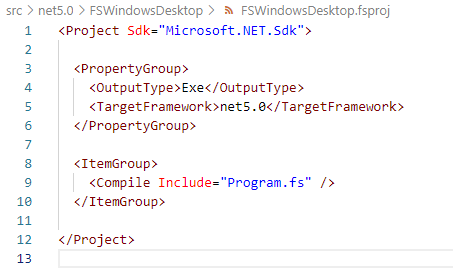
Let's start create new console project using F#, and name it FSWindowsDesktop using dotnet CLI:

dotnet new console -n FSWindowsDesktop -lang F#

We'll have this fsproj generated:


Change TFM from net5.0 to net5.0-windows, and also change OutputType to WinExe.

The output type change is important, because we have to explicitly tell the project that we have to mark the resulting Exe as Windows executable to run the app for Windows. See also the technical reason about this change since .NET 5.0: https://docs.microsoft.com/en-us/dotnet/core/compatibility/windows-forms/5.0/automatically-infer-winexe-output-type

Open the Program.fs, then copy the content of Program.fs from my previous .NET Core 3.1, then build it using dotnet build: (I name the project to same FSWindowsDesktop)

dotnet build FSWindowsDesktop\FSWindowsDesktop.fsproj

Then run it! Or, you can also compile and run the project using "dotnet run".

Now we're going to update the code to use one of the cool F# 5.0 features, the string interpolation!

Update the program.fs to be like this:


Note line 21, we use string interpolation to represent the name of the field/variable. It is useful, because now we could avoid compile error especially when the field/variable name changed!

I added the size of the mainForm, because we need to see the title of the form changed to include the string interpolation, combined with other new feature of "nameof". Run the code and we will see this WinForms window:


There you have Windows Forms project in F#! 
This time, with demo of string interpolation, and with also a sample of new "nameof" feature to include the name of the variable/module/symbol as string expression.

As always, the full code is available on my GitHub repo: https://github.com/eriawan/netcore-fsharp-sample

Enjoy and celebrate F# Advent 2020 and happy holiday and Merry Christmas, everyone! 


Sunday, March 1, 2020

Representing as Microsoft MVP at DevCon Digital Economy Summit

Hi guys!
I'm humbly proud that I have participated at the DevCon Digital Economy Summit 2020 that hosted by Microsoft Indonesia!
This event is held at Ritz Carlton Hotel, Pacific Place, Jakarta.

I was part of MVP Indonesia team that helps Microsoft Indonesia to promote, spread the event information, and also taking care of special MVP Indonesia's booth.


We are sooo honored to have President of Indonesia, HM Joko Widodo and MS CEO, Satya Nadella!


Here's me and fellow MVPs (Andri Yadi), taking care of MS MVP Booth, answering any questions about software development, .NET, and Visual Studio:


And we (Andri Yadi, Agus Suparno, Adiityo) still had some fun taking pictures with MS Asia's Annie Matthew and MS Indonesia's Irving Hutagalung:


Yup, I'm glad that I could provide help for software developer communities thru this conference! 😉


Monday, December 16, 2019

Speaking at Global AI Bootcamp 2019

Hi my blog readers!

This December is surely a surprising month, because December is usually the month that no community event gatherings are held in Jakarta, but there is one!

This time I had speaking engagements at Global AI Bootcamp 2019 meetup and workshop, organized by Buitenzorg Makers Club (BMC) and Dicoding. What a busy community, BMC! Some of you have known Fadhil, BMC lead. And under his lead, BMC has active records of having community meetups for more than 4 times/year!

This is the event link: https://www.dicoding.com/events/2782


NOTE:

  1. The Global AI Bootcamp is an annual global meetup/event, initiated by Microsoft with local event supports. that focused on AI on Azure.
  2. The global event in 2019 is in December, although it is usually on November.

The event was held on DiLo Kemenpora, a community place and also coworking space for meetup,

We have also other speakers: Fadhil himself, Endang Suwarna, Amir Umara.

The event is not just an ordinary seminar/presentation, but it also has workshop as well.

The audiences are not many (around 50) but the enthusiasm is so high! At my speaking time, I got asked a lot of heavy questions about AI.

Here are the scenes/pictures of the audiences:


The audiences are so active!

Here we have Fadhil and his crew delivered opening in a fun way:


Then I continued to present ML .NET:


and Visual Studio 2019 is in action:


On my session, I presented ML.NET with step by step tutorial from Microsoft Docs and from this official landing page of ML.NET: https://dotnet.microsoft.com/apps/machinelearning-ai/ml-dotnet

It is always so easy to learn and follow, because the code samples are also there and it is available on GitHub: https://github.com/dotnet/machinelearning-samples

I mainly focused on ML.NET for sentiment analysis and forecasting, because it is quite simple and it's also easy to train the AI model data, compared to other samples.

Then Fadhil presented his AI+IOT demo:


There were other speakers in session as well but I had to leave soon because I had other things to do after I finished my session and providing help for Fadhil and his session.

But of course we always had photo session 😉


It's a wrap, and I have to admit it was quite intense when answering the audiences questions, but again I'm always happy to contribute back to communities!

Thursday, November 21, 2019

Speaking at Global AI/MR Bootcamp 2019 Jakarta

Hi my blog readers!

Oh boy, 2019 is definitely a busy year!

I'm grateful and honored at the same time to have speaking engagements at Global AI/MR Bootcamp 2019 Jakarta meetup event on 16th November, 2019.
The event was organized by collaborations of Mixed Reality Community Indonesia and MUGI, with speaker from Buitenzorg! Yes, this is a full collaborative community event, mostly focusing on AI/MR (Mixed Reality). Thanks to Microsoft Indonesia for generously lend us the venue!


The speakers were me (MUGI), Adityo (MR Indonesia), Fadhil (from Buitenzorg). There was Riza that supposed to come and speak, but he was sick at the time of the event.


Here Adityo was giving the opening statement:


And accompanied with a cool AI/MR video from Microsoft:


Then he showed and presented cool HoloLens with his HoloLens app!


I presented AI in Visual Studio, especially  the trained AI of Intellicode in VS 2019:


And I also presented the ML.NET.

Last but not least, Fadil presented the AI on his IOT crafted devices:


The audiences were so enthusiasts and some of them grilled us with hard questions! GREAT!

It was quite a blast!

See you on the next MUGI Jadetabek event, guys! :)


Monday, October 28, 2019

Speaking at local Purwokerto's .NET Conf 2019 meetup!

Hi my blog readers!

If you have followed my blog trails, you'll see that this year (2019) since January I am mostly invited as speakers in various Indonesian meetups, especially topics on .NET, Azure, and Azure DevOps!

On 26th October, I was invited to speak at MUGI Purwokerto's event of .NET Conf 2019, at UNSOED Purwokerto. Thanks for the invitation, my MVP colleague Agus Suparno!

I'm so excited, because my other MVP colleague, Agus Kurniawan is also invited as speaker, not just Agus Suparno and me!


In this event I spoke about "Best practice of  .NET Core 3.0 CI/CDs using Azure DevOps", Agus Kurniawan presented .NET support for Apache Spark, and Agus Suparno talks about .NET ML (Machine Learning).

The audiences were enthusiastic, and there were some questions to me, especially when they want to start to learn .NET as platforms, especially there was an exchange student, he was Adnan Derbani. Thanks for adding me on LinkedIn!

Here are Agus K, Agus S and me presenting, starting from me:


And Agus Suparno:


Then Agus Kurniawan:


We also have learned some Big Data in Management perspective from Dr.Ade Irma Anggraeni, Senior Lecturer at UNSOED. Cool!


And a surprise bonus, a DevOps for practical for companies, presented by Darmawan Suandi:


Wow, it was a blast!

Can't wait to start more collaboration with other communities outside Jakarta! 😊❤

Monday, March 25, 2019

Speaking at Louisville .NET meetup,remotely speak and presenting Best practice of .NET Core CI/CD on Azure DevOps

Hi my blog audiences! Oh boy, another speaking time!

In February, I had speaking arrangements with Louisville .NET meetup, and Chad Green, the meetup's owner. Since December 2018, he had announced opportunity to speak for his meetup.

This is the Louisville .NET meetup page on Meetup.com:
https://www.meetup.com/Louisville-DotNet/

I'm honored, and at the same time feel so privileged to speak for his meetup, particularly knowing that English is not my first language. The topic I presented was about "Best practices of .NET Core 2.1 CI/CD using Azure DevOps".

This is the landing page of the event: https://www.meetup.com/Louisville-DotNet/events/258017408/


In this context, I focused on Azure DevOps Service. Yes, Azure DevOps Service is a rebrand from VSTS (also known before as Visual Studio Online).

NOTE: For those who wonders, the on-premise TFS will be named as Azure DevOps Server, and it will be released under the name of Azure DevOps Server 2019.

Thanks to Chad, he agreed to use Skype to speak and present for them (by sharing my desktop screen).

Here is the audience at that time (taken from my desktop screen: (on Skype)


The presentation


I had prepared the material and the talk before, including a github repo (link below) to specifically contain the presentation, the sample and demo.


The best practices for .NET Core 2.1 CI/CD are mostly concluded into these 3 main ideas (and also topics):

  1. Build and test locally first, without Visual Studio 2017 at all. It is recommended to use command prompt. Then use the knowledge and experience later to create CI on Azure DevOps
  2. Prepare and Implement Azure DevOps CI/CD.
  3. DOs and DON'Ts of Azure DevOps CI/CD 


The first topic is important, because Visual Studio 2017 always hides all of the mechanics that happened when you compile a solution. It is using MSBUILD, but the actual running sequence is always this:


  1. Restore and resolve all nuget packages using the .NET TFM information. For example: .NET Core 2.1 TFM is "netcoreapp2.1". The restore and resolve done at each project. The way nuget execute is closely related to the MSBUILD version used AND the VS 2017 used.
  2. Compile the projects in the solution, and check with resolved nuget packages
  3. If the RID specified, then "dotnet build" will tell MSBUILD to generate the necessary RID as well. Often, RID is liked with the OS used as target runtime OS.

Point #1 is important, because Nuget-MSBUILD-.NETCoreSDK-VS2017 usually has linked "train release" toolchain that we can't ignore.

For example:


Also getting used to know TFM is important, because .NET Core SDK project is editable from Visual Studio, and many tutorials from Microsoft shown these.

For more information on list of .NET Core TFM, please visit this official documentation: https://docs.microsoft.com/en-us/dotnet/standard/frameworks

By default, "dotnet build"  always use the latest SDK to compile. This will cause problem if you have many versions of .NET Core 2.1 SDK on your machine! The reason is quite trivial: the compilation and the assembly resolution will be different with your targeted TFM.

The way to minimize this is using "global.json" file that contains the .NET Core SDK you want to use, and put this on the solution folder.

For example:

{
  "sdk": {
    "version": "2.1.503"
  }
}

For more information on global.json syntax and usage, visit this official documentation: https://docs.microsoft.com/en-us/dotnet/core/tools/global-json

For more on my presentation, visit my repo of dotnetcore CI/CD sample: https://github.com/eriawan/dotnetcore-cicd-samples

Get the code


In my own Azure DevOps account, I have setup a sample CI to be shown as public, so the audience can follow my demo and presentation later.

The Azure Pipelines builds log for this meetup is available at: https://dev.azure.com/rxcommunica/rxpubliccrepo/_build?definitionId=18

So? Fork my repo and start doing DevOps now! :)