Showing posts with label C#. Show all posts

Friday, March 8, 2024

Speaking at DotnetConf 2023 on 28th February 2024, organized by MUGI Bogor

 Hi my readers! This time I spoke at one of .NET themed event, the DotnetConf 2023, on 28th February 2024. I was asked by Fadhil, he is ex-MVP and also a community leader of MUGI Bogor and Buitenzorg (IOT maker community).

Thanks to Microsoft Indonesia for let us borrow some space for the meetup!


This .NET Conf (or DotnetConf) is in sync with annual .NET Conf from Microsoft, and we are always celebrating annual new major release of .NET since .NET 5.0!

Yes, .NET since .NET 5.0 will always have major release annually, with emphasize on both LTS on even version number and STS on odd version number, see also this official blogpost from Microsoft:
https://devblogs.microsoft.com/dotnet/introducing-net-5/ 

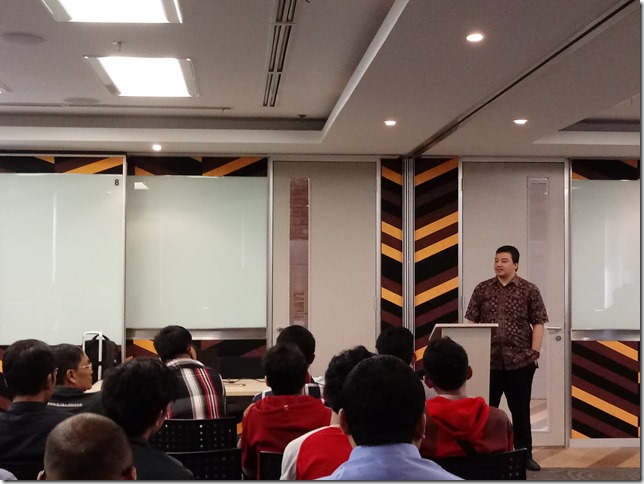
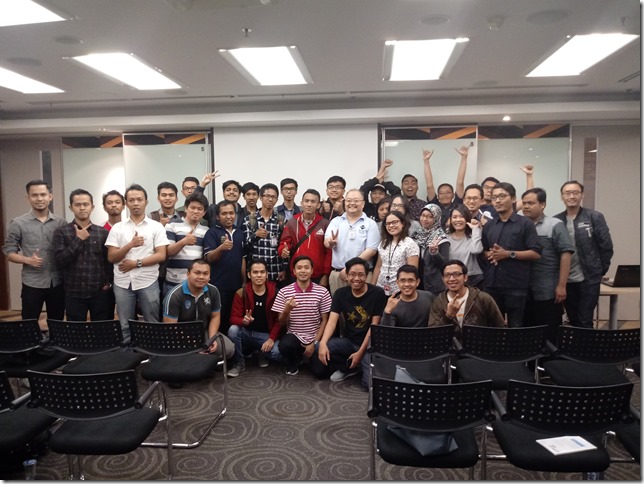
Pictures of the event and my presentation

I deliver presentation on What's new in C# 12 in .NET 8.0, using Visual Studio 2022 with .NET 8.0 202 SDK, and I enjoyed the audience attention so much because of the questions that keep coming at me :)

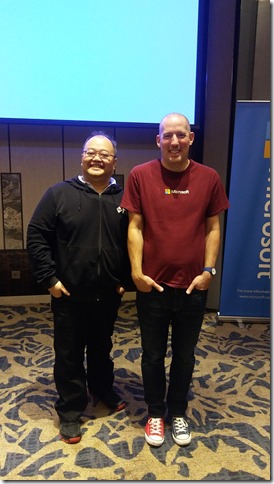
My session is not the first one, so I have got the chance to have pictures with Fadhil and Andik Susilo (the one that presents Monitoring Your Application with AppInsight)


Here's the pic: 


In .NET and C#, language advances are not so aggressive, because language advances must align with .NET CLR, and this is a good practice as .NET has known for its support for multiple programming languages, not just C#.

Yes, I have a demo with solution and projects, here it is the repo:
https://github.com/eriawan/eriawan-speaking-show-materials 

The notable feature is the C# primary constructors. which is taken inspiration from F#.


Here it is the F# counterpart:

Further code sample are also available on my repo.

Happy coding! 


Sunday, September 30, 2018

Speaking at dotnetConf Indonesia 2018

HI there, my blog audiences!
After watching full sessions of dotnet Conf on Channel9: https://channel9.msdn.com/Events/dotnetConf/2018
Now we have dotnetConf in Indonesia!
This event is held on 29th September
But to be honest, the dotnetConf Indonesia is not a complete relay, it’s within the same spirit of the dotnetConf itself: celebrating .NET world as we know and use extensively, especially on using .NET Core on your dev machine, cloud, and on mobile/any devices!
Thanks to Dicoding (https://www.dicoding.com) and Buitenzorg Maker Club (Bogor’s IOT community) to co-host and also promote this event, we have gathered around 100+ attendances!
dotnetconf2018_dicoding_poster
So in this event, we focus on .NET ecosystem and also its application, such as Blockchain using Nethereum, an open source implementation of Ethereum using C# and .NET Core.
I speak on having gentle intro on .NET Core 2.1, and currently at version 2.1.4 (and the related SDK version is 2.1.402).
I also have demonstrated how easy to develop and also at the same time have CI for free using Azure DevOps, as long as it’s open source projects Smile
The demo also focus on the fact that we can code in C#, F#, VB.NET on .NET Core!
.NET Core, although it is quite new, it is a true cross platform of .NET. It is not the same as .NET Framework that only runs on Windows.
Although .NET Core has about 80% API compatibility (except of course excluding Windows-specific API such as WPF, Windows Forms, and Workflow), some of the namespaces haven’t been ported yet.
Some namespaces that needs more works are the parity in System.Data, System.Data.Common, and some inconsistent detail on .NET Framework HttpContext and comparable .NET Core HttpContext.
I gave demo and also gentle intro on .NET Core 2.1, but from the feedback on the audiences, I had to give intro on .NET Core first then .NET Core 2.1.
This is not surprising, because most companies in Jakarta that uses .NET don’t know much or even somehow don’t care much about .NET Core.
We have always hoped that this event will bring more awareness that there is .NET Core, a truly cross platform of .NET and it is also performant!
Here’s the pictures from the event:
dotnetconf_eriawan_00
dotnetconf_eriawan_01
dotnetconf_2018_speaker_namecard
I gave the swag of this event:
dotnetconf_eriawan_02
Here’s Fuad giving presentation on DevOps in general:
dotnetconf_fuad_devops_01
And this is some of the speakers including me:
dotnetconf_speakers_01
From left to right: Puja (MVP), me, Marsya (MS Indonesia), and Fadhil (MVP)
Due to the fact that many of the audiences and also developer communities in Jakarta have asked me to provide blog to track .NET Core, I will spin off a new blog that’s specific to .NET Framework and .NET Core interop!
Watch this blog for the announcement Smile

Saturday, October 21, 2017

Participating in Microsoft’s Mission Mars of building chat bot using Bot Framework (as JakartaJS meetup workshop)

As one of Microsoft MVP in Indonesia, I’m often being asked to help other developer community to thrive and also to share knowledge. One sample of this is when I helped Software Architect Indonesia Community (SARCCOM) as speaker for their Meetup event: https://www.meetup.com/Software-Architect-Indonesia/events/242334607/

In early October 2017, I was asked by MS Indonesia to participate in 2 days event: MS Chat bot development training for community leaders and MVP to be trained as trainers, and the second day is helping as trainer assistant for Chat bot development to train for public (for everyone).

First, thanks to Microsoft Indonesia for this opportunity! I’m so glad that I get invited to this event while sharpening my skillset about developing Bot using MS Bot Framework! YES! Open-mouthed smile

It’s interesting to know that this event is part of Microsoft’s Mission Mars series, and usually Mission Mars is often held in outside Indonesia.

The event is held at Sheraton Hotel, Gandaria City, Jakarta, Indonesia.

The chat bot event

So, here is the event:

image

The trainer to train on day 1 is from Microsoft directly from US: Christopher Harrison!

Christopher Harrison is known for his MVA videos! This is also his MVA video on Bot Framework: https://mva.microsoft.com/en-us/training-courses/creating-bots-in-the-microsoft-bot-framework-using-c-17590

FYI, MS Bot Framework landing page is: https://dev.botframework.com/

And the official documentation is at: https://docs.microsoft.com/en-us/bot-framework/ and don’t forget to also contribute to the docs repo. Microsoft is always welcoming contribution to every Docs page of https://docs.microsoft.com/

It’s nice to know that this training is NOT just for MS MVP, but Microsoft Indonesia was inviting other Indonesian community leader such as leader from Python, Javascript, Ruby communities!

As a matter of fact, Microsoft Indonesia helped Jakarta Javascript community to have other workshop for the next day:

image

Therefore it’s always good to know that MS is really open!

The training was on 16th October, and the workshop was on 17th October.


The bot development training

The bot development training was focused as steps, fortunately we could see and try the steps directly from Mission Mars github: https://github.com/MissionMarsFourthHorizon/operation-max

The interesting thing about this sample steps tutorial is written in C# and Node.JS. So .NET is not required, you can choose to have NodeJS to create bot.

These are the pictures from the training day:

20171016_10113120171016_102214

20171016_10250720171016_134913

And here are the pictures of Christopher Harrison, the community leaders, and MVPs (including me, Kiki, Fadhil)

20171016_17252020171016_172756


And then, the next day, we helped Christopher Harrison to train!

Here are the shots after the training for public:

20171017_121556

And I sneak my opportunity to take picture with my APAC MVP Lead, Soyoung Lee:

20171017_110709

And also with my frieds: Irving Hutagalung and Anggita (from Microsoft Indonesia):

20171017_162233

GREAT!!!

Saturday, October 14, 2017

Speaking at MUGI Jakarta Gathering 2017 (October 2017)

Hi my blog 6audiences! Now it’s my speaking time for MUGI (Microsoft User Group Indonesia) community for Jadetabek (Jakarta, Tangerang, Bekasi region) under the umbrella of MUGI Nasional (nationwide). Although MUGI has quite a long hiatus (for about 7 months), we’re now ready to gather again full speed ahead.

Basically MUGI is a community of Microsoft’s product users ranging from MS Office users, Visual Studio developers (including C#/F#/VB/Xamarin/WPF/.NET), IT-pro (Windows Server, Exchange Server, Sharepoint) and other software users such as database developers that use SQL Server.

The event is called MUGI Jakarta Gathering 2017, on 7th October 2017. Thanks to Microsoft Indonesia’s support, we have venue support at Microsoft Indonesia’s office, located at BEJ Indonesia.

Thanks to the works of Hendra and Leo, we have secured some sponsorship fundings from Rhipe, Dell, Infront, Gulver and Omaging. Many thanks, guys!

MUGI_Jakarta_2017October_600_464823086

The speaking sessions are not  just me, there are from IT-pros such as talks from Leonardo, Hendra, and Fazar. Also a power user talk from Abdullah, as lead of MUGI nationwide.

About 2 months ago I have been assigned as MUGI Jadetabek lead, therefore I’m eager to have this meetup more frequent!

I gave talk about C# and Visual Studio 2017, especially what’s new since VS 2015 and VS 2017.

MUGI_Jadetabek_2017Oct_PowerPoint

Yes, C# 7.0 now has REPL, a feature that F# already has since initial release of F# 1.0!

But most of my talk is demo, based on the audience’s requests.

20171007_094257

Here’s some other pictures:

20171007_090714

Here is Abdullah gave talk about Digital Transformation:

20171007_091804

Here’s Leonardo Irawan brought Windows Server 2016:

20171007_111708

And here we had little break in the middle of sessions:

20171007_121606-1

And Hendra in action:

20171007_13022820171007_130536

And we are having a photo session for all audiences and speaker: (Leo did not join)

20171007_154410-1

Thanks for this memorable meetup, guys!

Next, MUGI Jadetabek has plan to have meetups about DevOps in December or no later than January 2018.

Monday, November 3, 2014

Loop construct of C#/VB mapped into F#

Hi there, my blog readers!
The F# adventure series is almost complete, and F# adventure series is focusing on F# 3.0 in Visual Studio 2012. Meanwhile, there were questions addressed to me about the basic common feature of programming languages: loop.
For those of you comes from C#/VB world, F# actually has the same semantic loop constructs.
F# has these loop supports:
  1. for loops with n times (incremental for in C#,For Next in VB)
  2. for loops that iterate the elements of a collection/set/array (for each in C#, For Each in VB since VB 8.0 in Visual Studio 2005)
  3. do..while that perform loop with test condition (same as do..while in C#, While..Wend in VB)
To simplify giving you the samples, I’ll take samples of F# directly from MSDN Library, paste them, and add the same samples with C# and VB.
Starts from Visual F# MSDN Library: http://msdn.microsoft.com/en-us/library/dd233249.aspx
Let’s visit the three loop above with samples:


F# loop C# VB
// for loop with n times

for i = 1 to 10 do
  printf "%d " i

// incremental for

for (var i=1;i++;i<=10)
   Console.Write("{0:d}",i);
‘ For Next

For I = 1 to 10
    Console.Write("{0:d}",i)
Next

// Looping over a list.
let list1 = [ 1; 5; 100; 450; 788 ]
for i in list1 do
   printfn "%d" i
// for each
var list1 = new Int32 { 1, 5, 100, 450, 788 }
for each i in list1
   Console.WriteLine("{0:d}",i);
‘ For Each
Dim list1 As Int32() = [ 1, 5, 100, 450, 788 ]
For Each i In list1
   Console.WriteLine("{0:d}",i)
End For
// while..do


let lookForValue value maxValue =
  let mutable continueLooping = true
  let randomNumberGenerator = new Random()
  while continueLooping do
    // Generate a random number between 1 and maxValue.
    let rand = randomNumberGenerator.Next(maxValue)
    printf "%d " rand
    if rand = value then
       printfn "\nFound a %d!" value
       continueLooping <- false


// do

void lookForValue(Int32 value, Int32 maxValue)
{
    var continueLooping= true;
    var randomNumberGenerator = Rendom();
    do
    {
        var rand = randomNumberGenerator.Next(maxValue)
        Console.Write(rand);
        if (rand == value)
        {
             Console.WriteLine(rand);
             continueLooping = false;
        }
    } while (continueLooping)
}
‘ While..Wend

Sub lookForValue(value As Int32, maxValue As Int32)
    Dim continueLooping= True
    Dim randomNumberGenerator = Rendom()
    While continueLooping
        Dim rand = randomNumberGenerator.Next(maxValue)
        Console.Write(rand)
        If (rand == value)
             Console.WriteLine(rand)
             continueLooping = false
        End If
    End While
End Sub

There you have it now! All of those samples mapped from F# codes are semantically the same, although the low level IL implementation might be different.

In For Next, VB will hoist the variable of the loop limit first. But this will change after Roslyn compiler is shipped with Visual Studio 2015, as C# and VB now have the same compiler infrastructure.

Great question my blog reader, and I will include this in my completed F# adventure series!

Tuesday, June 10, 2014

An adventure journey of Functional Programming and F# 2.0 in Visual Studio 2010: Part 6 of 17

Hello there!

This blog of F# contains full (long) blog posts of adventure in functional programming and F#. I call it adventure, because I’ll try to make F# as fun to as possible to learn.

NOTE:

This blog is starting to use Visual Studio from Visual Studio 2012 and Visual Studio 2013 (from Release Candidate to RTM), and provide hints of F# 3.0 in Visual Studio 2012.

Now, here are the parts:

  1. Part 1: Introduction to Functional Programming
  2. Part 2: Functional Programming Concepts
  3. Part 3: Introduction to F#
  4. Part 4: Functions, Delegates and Computation expressions in F#
  5. Part 5: F# standard libraries
  6. Part 6: OOP in F# (you are here)
  7. Part 7: Using LINQ in F# (and the upcoming F# 3.0)
  8. Part 8: F# Asynchronous workflow
  9. Part 9: F# MailboxProcessor
  10. Part 10: Units of Measure
  11. Part 11: F# Power Pack
  12. Part 12: F# for Silverlight 4 (and above)
  13. Part 13: A look at F# 3.0 in VS 11 (Visual Studio 2012)
  14. Part 14: A look of Functional Programming in VB 10 and C# 4.0 compared to F#
  15. Part 15: A look of F# compared to Haskell, Scala and Scheme
  16. Part 16: F# future and what features that F# must have
  17. Part 17: Retrospective


OOP in F#

F# is not just a functional programming language, but it is also an object oriented programming language which also an imperative programming language.

The OOP feature of .NET are supported by F#, including interfaces, classes, inheritances, method overrides, overloads.

The classes created in F# can be used in C#, VB and others because it’s generated into the same IL that C#, VB and other have (as long as the IL is standard .NET CLR’s IL).

This OOP feature is where the flexibility of F# has risen above all other functional programming languages that only offers pure functional programming languages. But this flexibility also marks F# as non pure functional programming language.

Why? This is where the critics often attack F#. Before diving deeper into F# OOP, I'm going to introduce a very quick glimpse of OOP.

OOP often described as how you develop software using object as the main attention.

An object in OOP is an object that has attributes and behaviors, just like us humans.

Attributes can be name, address, gender, nationality. Behaviors in OOP are the common capabilities that we have, such as Walk, Run, Eat, Drink.

This is a simple illustration of human as object:

simple_oop_illustration_6F308F4D

We can often inherit our attributes (but not all) from our parents, and so does our behaviors. This is called inheritance, the most common known concept part of OOP.


OOP first stop: Inheritance, Polymorphism, Encapsulation

Inheritance in OOP is really what makes OOP really shines: the ability to inherit an available object with all of the visible allowed attributes and behaviors.

It is called visible allowed attributes, because there are scope modifiers at the attributes that control this visibility.

In F#, these are allowed scope modifiers:

  • public
  • private
  • internal (the scope is only assembly scope)

F# does not allow protected modifier, like those in C# and VB.

But this OOP doesn’t stop just having inheritance.

Generally OOP has these 3 concepts:

  • Inheritance
  • Polymorphism
  • Encapsulation

So, what are Polymorphism and Encapsulations?

Polymorphism is concerning the change of behavior when an object inherits other object, this is why there are method overrides that define behavior overrides.

Encapsulation means an object is known to outside by having definition of attributes (properties in .NET and C#/VB/F#) and behaviors or operations.

In F#, OOP is supported in the form of class and interface.


Interface in F#

Interfaces in F# are implemented in two ways:

  • Using object expressions
  • Using class types

To create interfaces using class types are quite straightforward, the syntax is similar to interface declaration of C# and VB.

This is the syntax using class types:

// Interface declaration:
[ attributes ]
type interface-name =
   [ interface ]
     abstract member1 : [ argument-types1 -> ] return-type1
     abstract member2 : [ argument-types2 -> ] return-type2
     ...
   [ end ]

This is a sample code of creating interfaces using class types (from F# in Visual Studio 2010 Tutorial template):

type IPeekPoke =
    abstract Peek: unit -> int
    abstract Poke: int -> unit

The IPeekPoke will be treated as interface and will have the same signature as declaring interface in C# and VB. By default, the access modifier when not specified is public. This interface can also contain other members not just methods, but it can contain properties:

type IConnectionFactory =
    interface
        abstract ConnectionString : string with get, set
        abstract ConnectionState : int with get
        abstract Open : unit -> unit
        abstract Close : unit -> unit
    end

The interface declaration above can also be written to omit interface keyword that ending with end keyword:

type IConnectionFactory =
    abstract ConnectionString : string with get, set
    abstract ConnectionState : int with get
    abstract Open : unit -> unit
    abstract Close : unit -> unit

The type IConnectionFactory simulates a database connection commonly found in System.Data. It demonstrate an abstract property of ConnectionString with setter (set) and getter (get), ConnectionState that has getter only, and abstract method of Open and Close.

Note that F# clearly defines that each method that has no parameter and returns no parameter has to have signature as unit, returning no parameter as unit.

To create interface using object expressions, the interface are declared within a class. This is the syntax:

// Implementing, by using an object expression:
[ attributes ]
let class-name (argument-list) =
   { new interface-name with
       member self-identifier.member1 argument-list = method-body1
       member self-identifier.member2 argument-list = method-body2
       [ base-interface-definitions ]
   }
 

member-listThis is a sample of interface implemented using object expressions:

let makePrintable(x: int, y: float) =
    { new IPrintable with
              member this.Print() = printfn "%d %f" x y }
let x3 = makePrintable(1, 2.0)
x3.Print()

The advantages of using the object expression syntax are subtle: the interface does not have to be named and the scope of the interface is not visible from outside. Concrete implementation has to be implemented directly inside the class. But the disadvantage of using this syntax is quite clear; this syntax has no comparable features in C# and VB.
Create type that implements interfaces
To create types that implements interface, the interface must be declared using class type syntax.

For example, we can create type that implement IPeekPoke interface above:

// Types: classes with interface implementations
// ---------------------------------------------------------------
/// A widget which counts the number of times it is poked
type Widget(initialState:int) =
    /// The internal state of the Widget
    let mutable state = initialState
    // Implement the IPeekPoke interface
    interface IPeekPoke with
        member x.Poke(n) = state <- state + n
        member x.Peek() = state
    /// Has the Widget been poked?
    member x.HasBeenPoked = (state <> 0)

Now, to call the method of the interface, F# requires the call to be explicit to specify the interface, and this is clearly specified in MSDN Library:

"Interface methods can be called only through the interface, not through any object of the type that implements the interface. Thus, you might have to upcast to the interface type by using the :> operator or the upcast operator in order to call these methods."

This is a sample code to call methods of IPeekPoke:

let widget = Widget(12) :> IPeekPoke
widget.Poke(4)
let peekResult = widget.Peek()

There is an alternative syntax to call interface method.

An alternative is to declare a method on the object that upcasts and calls the interface method, as in the following example, with comparison of having an added sample of using upcast of above:

type IPrintable =
   abstract member Print : unit -> unit

type SomeClass1(x: int, y: float) =
   interface IPrintable with
      member this.Print() = printfn "%d %f" x y

type SomeClass2(x: int, y: float) =
   member this.Print() = (this :> IPrintable).Print()
   interface IPrintable with
      member this.Print() = printfn "%d %f" x y

// sample usage
let x2 = new SomeClass2(1, 2.0)
x2.Print()

The code of SomeClass2 declaration define member Print that has upcast to IPrintable.Print and also has concrete implementations of Print method.


Class in F#

A class in F# is the same class in C# and VB. A class can have properties and methods, with fields as well.

Class in F# is quite straightforward. You can create class with no constructor or with default constructor with parameters.

Declaring a class with no constructor will imply that the class will have default constructor that has no parameter.

This is the base syntax:

fsharp_class_declaration_7A0D7095

In the preceding syntax, the type-name is any valid identifier. The type-params describes optional generic type parameters. It consists of type parameter names and constraints enclosed in angle brackets (< and >). The parameter-list describes constructor parameters. The first access modifier pertains to the type; the second pertains to the primary constructor. In both cases, the default is public.

A class that inherits from specific type is defined using inherit keyword. If there’s no inherit, then the class is automatically or implied to be derived from System.Object, just like every classes in .NET.

This is a very simple but good sample from Tutorial.fsx from F# template:

fsharp_class_sample_58419804

When you define types that reference each other in a circular way, you string together the type definitions by using the and keyword. The and keyword replaces the type keyword on all except the first definition, as follows.

This is why in MSDN called as "Mutually Recursive Types".

A sample of mutual recursive type:

fsharp_mutual_recursive_type_3CBC9601

You can also add generic type parameter for the type.

Generic in F# is declared in “<generictype>” syntax, like “<’T>” with single quote added to differentiate a concrete type or truly generic type.

This is a sample of generic in class declaration:

fsharp_generic_class_143DB3ED


Defining abstract classes

F# also supports abstract class. An abstract class in F# is the same abstract class in C# and VB, and it’s also semantically the same.

An abstract class in OOP is simply a class that has abstract method or properties with no implementation body but abstract class can also have concrete method.

In F#, abstract class must have AbstractClass attribute. The abstract method and properties must have abstract keyword as identifier.

Sample abstract class:

fsharp_abstractclass_sample01_7924E4DE

The class that derives from an abstract class MUST implement all of the abstract members.

Sample derived class from Shape2D class:

fsharp_abstraclclass_sample_concrete_6F1043B3


Declaring properties in F#

Property in F# is the same as property in C# and VB, and they are also semantically the same. This is also one advantage of F# of seamlessly interop with C# and VB to have OOP support, not just interface and classes supports.

Declaring properties is simple, using member keyword with the desired set and get.

NOTE: when defining properties, all property value  is mutable by default because of the nature of getter and setter in OOP.

Syntax:

fsharp_property_syntax_65D40872

Declaring the property starts with member keyword, with the combined get and set accessors.

If the get and set are combined, with keyword must be used.

Sample:

fsharp_property_sample01_2314BD3A

Or we can use separate set and get, like this sample:

member this.MyReadWriteProperty with get () = myInternalValue
member this.MyReadWriteProperty with set (value) = myInternalValue <- value

Begins with F# 3.0 in Visual Studio 2012, F# can use auto properties just like auto properties in C# and VB.

Sample of auto properties:

fsharp_property_autoproperty_sample_2F363761


Further reading

  1. Tutorial of OOP in Java (but it can be applied in .NET): http://docs.oracle.com/javase/tutorial/java/concepts/
  2. Interface in F#: http://msdn.microsoft.com/en-us/library/dd233207.aspx
  3. Classes in F#: http://msdn.microsoft.com/en-us/library/dd233205.aspx

Wednesday, January 8, 2014

TEACHING: Study club of MUGI Jadetabek on Developer Track, WEEK 5

Now, it’s week 5! We could not have the workshop within the next week of week 3 because of my busy schedule, sorry!

In this week 5, we decided again to meet at QQ Kopitiam, at Pacific Place at 10:00AM. This scheduled time was agreed upon us by communicating via email before. Unfortunately Wakhid has to take care of his administrative undergraduate submission paperworks so he couldn't attend this week. And Aris also can’t attend this for personal reason. Next time, please be punctual, guys!

Yup, the show must go! Sorry to leave you if you weren’t present, guys! It’s fortunate for Reza and Siti Smile

Now we already have grabbed the basic concept of generics and colections, now we are moving to LINQ concept but with the introduction of advanced Lambda expression.

Why do we have to know Lambda? Because the answer is quite simple but somehow often missed in many LINQ literature: LINQ is composed by anonymous delegate. This anonymous delegate is often written in functional syntax as Lambda, to emphasize that expressiveness of an anonymous function is available to use and to compose nicely.

Let’s revisit the basic sample of SELECT in LINQ to Object:

using System.Diagnostics;
using System.Linq;

namespace SampleAdvancedLambda
{
    class Program
    {
        static void Main(string[] args)
        {
            var processnames = (from p in Process.GetProcesses()
                                select p.ProcessName).ToList();
        }
    }
}

The code above (in bold) is basically the same as:

var processnames = Process.GetProcesses()
    .Select(p => p.ProcessName).ToList();


Again, type inference will infer that processnames is a List of String, the type syntax is List<String>. Type inference happens nicely because the select will infer the property of ProcessName, and this property is typed String.

The notation of “=>” in the Select method is a form of denoting Lambda Expression. Although this is a syntactic sugar, it’s quite powerful syntax to replace tedious one line anonymous delegate.

But, what happened inside a select? Basically this is a select method body: (it has to be inside of a static class)

public static class QueryHelper
{
    public static IEnumerable<U> Select<T,U>(this IEnumerable<T> data, Func<T,U> selector)
    {
        foreach (var item in data)
        {
            yield return selector(item);
        }
    }
}

If you look at the signature, there’s “this” keyword to identify that this is an extension method of IEnumerable<T> (the first parameter).

Looks like they were having a little bit difficulties to grab this concept, here are their expression: Smile

WEEK5_01


I also gave them some sample cases, like constructing your own ForEach and ForNext (For Each with index) as Lambda.

And Abdullah is joining force to dive this concept!

WEEK5_02


Fortunately, they began to see the light that Lambda Expression is not that hard!

WEEK5_03


Further references:

  1. C# Extension method reference in Visual Studio 2010: http://msdn.microsoft.com/en-us/library/bb383977(v=vs.100).aspx
  2. C# Lambda Expression in Visual Studio 2010: http://msdn.microsoft.com/en-us/library/bb397687(v=vs.100).aspx