Friday, May 22, 2015

Current state of Visual Studio releases [May 2015]

Hi my blog readers! I know, this blog installment should be out regularly at 19th or 20th May, but there are many things to be discussed and lots of excitements to be shared for you before I publish this. So please be with me Smile

This is the third installment of Visual Studio releases update. In this installment, again, there are many exciting news about Visual Studio!

Here they are:

  1. The release of Visual Studio 2015 Release Candidate (also called Visual Studio 2015 RC) on 29th April 2015
  2. The release of Visual Studio 2015 SDK Release Candidate (also called Visual Studio 2015 SDK RC) on 29th April 2015
  3. The release of Visual Studio Code (preview)
  4. The release of Visual Studio 2013 Update 5 Release Candidate on 28th April 2015
  5. Github Extension for Visual Studio 2015 release (it’s also available as an option when installing Visual Studio 2015 RC)

Now here are the breakdown of those above. A friendly warning: this is a loooong list, a little bit TLDR.

Visual Studio 2015 Release Candidate

As usual, if Microsoft releases a software that has RC mark, the RTM release is near: within 3-4 months. Yes, it’s at faster cadence as indicated by my previous blog almost 2 years ago: http://fsharpmonologue.blogspot.com/2013/07/current-state-and-product-lifecycle-of.html

NOTE: This meaning of RC thing may be only apply at Microsoft world and this is common at least in the last 14 years (since Windows XP). In detail, the release of RC means the feature is fixed. This simply means that there will be no new features for the next release for the RTM. The next release of RC can be RC2 or the release, usually (officially) named as RTM, or Release-To-Market.

Even at the release of VS 2010, this trend of faster cadence has stabilized. Yes, there was broken rule of semantic versioning between VS 2012 and 2013, and it was quite annoying. The new version of Visual Studio 2013 should be bringing more features instead of just minor updates and fixes.

Fortunately, Visual Studio 2015 has many good news:

  1. It’s not just a new release, it has tons of new features compared to Visual Studio 2013
  2. VS 2015 has Roslyn (VB and C# compiler as a service) built in. And it’s also open source!
  3. Because of the nature of opening Roslyn, the communities are actively influencing the development of Roslyn and therefore the proposals of features are rapidly introduced and many of them are very good!
  4. The Visual Studio 2015 family has different products, but the price will be lower than the previous Visual Studio 2013 with MSDN subscription offers. This also includes the next release of Visual Studio 2013 Community Edition, the Visual Studio 2015 RC Community Edition. There will be NO Visual Studio Premium with MSDN subscription for Visual Studio 2015, as the VS 2015 Premium is named as Visual Studio 2015 Professional. The original VS 2015 Professional offering is now Community Edition.
  5. CodeLens is available on Visual Studio 2015 Professional. Originally it was available only at Visual Studio 2013 Ultimate Edition since Visual Studio 2013 Ultimate Edition Update 2.
  6. The original Ultimate edition is now available named as Enterprise edition in VS 2015

The official announcement is available at Visual Studio blog: http://blogs.msdn.com/b/visualstudio/archive/2015/04/29/build-2015-news-visual-studio-code-visual-studio-2015-rc-team-foundation-server-2015-rc-visual-studio-2013-update-5.aspx

You can download Visual Studio 2015 RC (Community, Professional, Enterprise) at: https://www.visualstudio.com/downloads/visual-studio-2015-downloads-vs

VS_2015_RC_download

Visual Studio 2015 SDK Release Candidate

This SDK is released at the same time of Visual Studio 2015 Release Candidate. It is also contains the implementation of Roslyn integrated into the way of Visual Studio extension development.

You can also try the samples (included in the SDK) and experiment cool new features of Roslyn, such as building AST of the code (C# and VB only) and analyze your code.

One of the nice features of Visual Studio 2015 is the Light Bulb suggestions when you code using built in managed languages (VB, C#, F#, managed C++) and native C++. Therefore you can also build your own custom Light Bulb suggestions using Visual Studio 2015 SDK. For more information about custom Light Bulb development, visit: https://msdn.microsoft.com/en-us/library/dn903708(v=vs.140).aspx

The official announcement of VS 2015 SDK RC is available at the same Visual Studio blog entry above: http://blogs.msdn.com/b/visualstudio/archive/2015/04/29/build-2015-news-visual-studio-code-visual-studio-2015-rc-team-foundation-server-2015-rc-visual-studio-2013-update-5.aspx

Visual Studio 2015 SDK RC can be downloaded at: http://www.microsoft.com/en-us/download/details.aspx?id=46850

Visual Studio Code

A new Visual Studio family is here! It’s very light, free, and cross platform!

Now why I emphasize this? There has been a strong image that Visual Studio will never have lightweight editor that runs on OS other than Windows!

What is Visual Studio Code, really?

It is simply a lightweight development editor but with intelligent features partially borrowed from a full big IDEs such as intellisense, code completion, keyword highlights. It’s based on Omnisharp, a lightweight editor that is also open source. The web development editing part is based on Electron, a subpart of Atom which is also open source. Omnisharp itself is an Atom package that provides C# and ASP.NET support.

At the time of this writing; Visual Studio Code isn’t yet reached RTM. The initial version number is version 0.1.0.

This is the official home page of Visual Studio Code: https://code.visualstudio.com/

One more thing, I have mentioned cross platform! Because Visual Studio Code runs not just on Windows, but it can run on Linux Linux 64-bit, and MacOS.

To download the current Visual Studio Code, you can get it at the landing page (home page) above.

Visual Studio 2013 Update 5 Release Candidate

Yes, you got it right: it’s another update for Visual Studio 2013 after Update 4.

Now what does this Update 5 have? Actually, it’s simply Update 4 with numerous bug fixes and a small additional feature, including these notable bug fixes:

The additional small features are:

  • Team Project rename support for Team Foundation Server (on premises). Visual Studio Online also has this feature.
  • A new query token for query iteration: @CurrentIteration (it is case sensitive name). This feature is previously available on Visual Studio Online since March 10. See https://www.visualstudio.com/en-us/news/2015-mar-10-vso.aspx

NOTE:

This update is the last release of Visual Studio 2013 update, so there will be no next Visual Studio 2013 Update after Update 5.

Github Extension for Visual Studio 2015

There is support for GitHub built in, not just Git repo support since Visual Studio 2013 initial RTM release. This extension is available as an option when installing VS 2015 or as stand alone installation.

Not just GitHub, but initial feature of pull request, merge, diff, sync, graph is also available.

This is the announcement from official Visual Studio blog: http://blogs.msdn.com/b/visualstudio/archive/2015/04/30/announcing-the-github-extension-for-visual-studio.aspx

The picture below is taken from the blog entry:

4048.BUILD2015-GithubExt-Team Explorer

To download stand alone installation of this GitHub extension, visit: https://visualstudio.github.com/?CR_CC=200627595

Monday, May 11, 2015

Speaking on Lambda Jakarta: welcoming new Lambda Jakarta meetup member, new organizer, platform concern, and more

Lambda Jakarta meetup time! Now the meetup is themed “Casual Meetup”. This meetup is now located at Starbuck, at Tebet Green Mall on May 9, 2015.
The meetup is casual, as currently we didn’t have defined talks to be delivered but we have free topics (about programming language, of course) and still mainly focusing on functional programming.
For the detail on this meetup, visit the official event page: http://www.meetup.com/Lambda-Jakarta/events/222067797/

Agenda on this meetup is themed basically on these:
  1. Announcement of new organizer, handled from Abdullah to Tino (a.k.a. “Kusut”)
  2. Planning for the next meetup to have some presentations for next meetup. Again, I voluntarily for the next meetup
Without further ado, let’s welcome Kusut as the new organizer! Kusut has been around for more than 6 years in programming. Currently he has been fluent in Python, Ruby. For the last 2 years he began to dive into Haskell, with the help of Abdullah and Erik. By the way, Erik was one of the original founder of Lambda Jakarta meetup.

UPDATE 1: The original founder is Abdullah, Kusut and Asep. Thanks for clarifications, Erik :)

We welcomed new members: Rezha, Irvan and 2 more (sorry guys, I can’t remember your real names). Reza is still undergraduate student, with a passion to learn more than just OOP and procedural programming languages in his study! Irvan is still working at Traveloka as team leader and also software architect.
This is the picture:


The total of attendances was not so many, it was about 15 attendants. But we have so much fun discussing what happened in programming language world, and we agreed that we will touch more on platform.

After we introduced ourselves, we had topics to discuss. As always, I was happy to answer and discuss more on F#, .NET and platform relevance.

Platform (runtime platform) concern


Platform in this sense is platform in a sense of runtime platform, either .NET (and its Mono on Linux/UNIX) and Java. True that we as Lambdas love Haskell, but Haskell itself can’t be considered as true platform on its own. I shall focusing on the runtime virtualization platform on these two: .NET and Java.

Non runtime virtualization is usually native and closer to metal, like Win32, Bash, Csh, ObjectiveC, and many more (including DirectX, device driver).

A simple illustration about this native versus virtualized is:


Now you may wonder, why .NET/Mono apps (and hence Java) called managed? Because they have their own virtualization on top of the native OS runtime.
Therefore this bring these consequences:

  1. Applications has their own shared virtualized runtime, often in some isolated fashion (in modern OS such as Windows Store Apps in Windows 8.0 and 8.1)
  2. Memory, I/O, and other side effects are managed as abstracted from the underlying native OS. Often the virtualization provides some mechanism to access native OS API. Some example of this is the use of P/Invoke within .NET apps and JNI within Java.
  3. These abstractions can add a little overhead to the performance, but this is by design. This also brings more room for innovations such as cross platforms (in a sense of running on other OS platform). We see in real world as Java and .NET/Mono, that runs on Windows and Linux/UNIX/MacOS.
  4. When these virtualized apps run, not just in a managed environment but most of them are often well behaved as they often have a little knowledge of how they run in parallel according to the underlying OS. Therefore there are no simple or definite way to provide one-on-one performance profile on many OS. This is why (again) managed applications are mostly not geared for performance when compared against native applications.


Now that we understand why they are managed, it’s time to understand implications on the functional programming world. We know that Scala in Java and F# in .NET/Mono are the strong contender for the managed programming languages that also functional!

But then, at the core of those platforms, the virtualized platforms matter itself. The choice between Java or .NET is still not easy, as each platforms has their own advantages over the others.

Platform (runtime platform) choice


Why the choice of the runtime matters more? Because there’s no easy interoperability between the two major platform.

My own choice? The answer is complicated, but for those like me that already has enough manhours spent on these two, the clear winner (although it has its own disadvantages) is .NET.Let’s dive into the current states of Java as runtime.
Java 8, the latest incarnation of JDK, has these:

    1. Generic support (using type erasure strategy) since JDK 1.4
    2. wildcard for covariance/contravariance relaxation, but it’s still partial due to type erasure
    3. rich type reflection through bean descriptor and class mechanism (explicit setter and getter)
    4. No tail call support yet


    .NET 4.5 has these:
    1. Generic support using type reification strategy since .NET 2.0
    2. support for STRUCT type (value type as .NET called it)
    3. Iterator since .NET 2.0
    4. Parallel support since .NET 4.0
    5. Covariance/contravariance in generics
    6. rich type reflection through inherent setter getter with properties
    7. tail call
    My main reasons in deciding that .NET is the winner are the type reification, STRUCT type, and the covariance/contravariance support. There are also minor comparing factor such as Lambda statements in Java, but this is not a true comparison as Lambda is truly language feature, not runtime feature.
     
    Curious about type erasure? Read this from the official source: https://docs.oracle.com/javase/tutorial/java/generics/erasure.html

    But for me, the most decisive factor is the use of type erasure in Java. It’s quite annoying because the type information can’t be ensured at runtime! This is the big issue in Java that is a big disadvantages compared to .NET. It’s also a wrong decision at start, for the sake of compatibility.
    This matter of type erasure choice has its own backup supporters, such as this guy in a blog post for example. But still in that article, he also mentioned that it’s still a wrong decision.
    Further implications? Many! The nature of functional programming languages are strong type everywhere, including generic supports. This weak generic support of Java can make even Scala losing its backers in long run as it doesn’t fit for strong functional programming runtime.
    Hey, I’m not Java haters! I’m still a polyglot developers, and I still have high hope for Java. For Java 9, there will be a support for STRUCT type, and Java 9 will be the starting point to support type reification, by paving the way for STRUCT.
    This means that we’ll see type reification after Java 9. But the exact release will be further decided by the community and Oracle. Don’t be excited first, guys.

    What about Haskell?

    Unfortunately there’s no definite answer about this. We still don’t know yet about mature support of Haskell in Java or .NET. There is GHC for .NET, but this support is still far from mature and stable although it was developed by Simon Peyton Jones, the same guy developed GHC.
    My big intelligent guess is: there’s no direct support for type classes in the runtime, and it’s also quite hard to implement pure functional language boiled into the managed runtime. Try implementing Haskell’s IO monad using the managed runtime, for example. You will find it quite hard even for long time .NET developers.
    That’s it, folks! Can’t wait to attend the next Lambda meetups!


    Thursday, March 26, 2015

    Current state of Visual Studio releases [March 2015]

    Hi, my blog readers!

    This is the second installment of Visual Studio releases update information on March 2015.

    For complete series of Visual Studio releases update of my blog, go to: http://fsharpmonologue.blogspot.com/search/label/Visual%20Studio%20release%20state%20update

    For March 2015, we have exciting news about Visual Studio! There are:

    1. Visual Studio 2015 CTP 6 (February 2015)
    2. Team Foundation Server 2015 CTP (February 2015)
    3. Tooling SDK of Windows 10 (official name: Visual Studio Tools for Windows 10 Technical Preview2015

    This update is a little bit late (it should be on 19th or 20th March), as I was keeping up with the streaming broadcast of dotnetconf 2015.

    The dotnetconf 2015 is an online conference for all of .NET update including .NET Core, WPF, ASP.NET, Roslyn, F# and many more!

    Didn’t have time to watch? Watch or download offline at: http://channel9.msdn.com/Events/dotnetConf/2015

    ENJOY!

    Now, here are the updates…

    Overview of the updates on March 2015


    Now let’s dive into those three above!

    Visual Studio 2015 CTP 6

    Visual Studio 2015 is at CTP 6. The CTP marks that this release is not for “go live” or for production environment. I will keep stating (or reminding) this as many of you, blog readers, including my friends are confusing the CTP for production environment.

    This CTP 6 contains these notable features and improvements:

    • UI debugging tool for XAML
    • Single sign in (with integration to other cloud based authentication)
    • Code Lens improvement for Git and also with support for C++, Javascript, and SQL script
    • Code Maps improvements such as filtering, faster display (faster diagram rendering) performance
    • Visual Studio tools for Cordova now supports Android 4.4 and 5.0 (Lollipop)
    • Javascript editor improvement: support for // TODO comments, object literal intellisense
    • and many more!

    For complete list of CTP 6 release notes, visit: https://www.visualstudio.com/en-us/news/vs2015-vs

    The official blog that described this release is available at:

    http://blogs.msdn.com/b/visualstudio/archive/2015/02/23/visual-studio-2015-ctp-6-and-team-foundation-server-2015-ctp-released.aspx

    With the release of CTP 6, it’s expected that Visual Studio 2015 is nearing the release of Release Candidate. This assumption is safe unless there is a notable bug needs to be fixed.

    Special notes:

    • The UI debugging tool for XAML in CTP 6 only supports WPF. Support for Windows Store app will be available in the final release.

    The UI debugging is surely a very useful feature:

    Please check up the original blog post of Visual Studio for more detailed explanation: http://blogs.msdn.com/b/visualstudio/archive/2015/02/23/visual-studio-2015-ctp-6-and-team-foundation-server-2015-ctp-released.aspx

    Well.. I suggest you should download the ISO instead of using web installer to minimize error while installing this CTP, since the download is more than 4GB.

    Team Foundation Server 2015 CTP

    Team Foundation Server 2015 CTP is the next release after the preview release (the same time at Visual Studio 2015 Preview public release).

    There are not so may improvements, but the improvements are mostly worthy to be considered:

    • REST API support for TFS (previously only available for online TFS, Visual Studio Online)
    • Team build improvements, including preview on MSBuild activity on TFS web portal (when accessing TFS via web) and cross platform builds (YESSS!! not just on Windows, now on Linux, XCode, and Android)
    • Assign and invite testers
    • and more (although it’s not so numerous)

    The assign and invite testers is very helpful. Now you can invite testers, attached with the test suite number to test.

    This is the screenshot from VisualStudio.com website (link below):

    vs2015_testers_invite

    Those  screenshots are taken from the notable release notes of Team Foundation Server 2015 CTP. The official link is:

    https://www.visualstudio.com/news/tfs2015-vs

    Personal note on TFS:

    Compared to other ALM product such as SVN or even commercial one such as StarTeam, TFS has widen the competitive edge. But compared specifically to IBM Rational UrbanCode coupled with IBM Rational Team Concert, TFS is quite on a par to IBM’s.

    Visual Studio Tools for Windows 10 Preview (a.k.a. Tool for Windows 10 Preview)

    Before you proceed, please read and notice my friendly reminder below.

    If you want to try develop apps in Windows 10 Preview, this tooling is the one that you must install after you install Visual Studio 2015 CTP 6.

    Why, because Visual Studio 2015 CTP 6 is the prerequisite of this tool.

    Yes, the latest Windows 10 Preview on March 2015 is also available to be downloaded! But it is available after you join/register first for the Windows Insider program. Don’t worry, it’s totally free! Just go to this official site: http://windows.microsoft.com/en-us/windows/preview-faq

    If you are done installing, there will be a new template for Windows 10 UAP (Universal App Platform) projects, not just the usual Windows 8/Windows 8.1/Windows 8.1 (phone) Universal Apps.

    To bring you quick peek, I copy picture from Microsoft’s Somasegar’s blog on Visual Studio Tools for Windows 10:

    vs2015_template_npd-win10

    Here is the original location of Somasegar’s blog entry: http://blogs.msdn.com/b/somasegar/archive/2015/03/23/visual-studio-tools-for-windows-10-technical-preview.aspx

    Now what are you waiting for? Code right now, guys! :)

    Tuesday, January 20, 2015

    Current state of Visual Studio releases [January 2015]

    Hi my blog readers!

    Begin with this date, I will post Visual Studio updates every 2 months: January, March, May, July, and so the next 2 months.

    The update from me will always be released on every 19th or 20th bimonthly.

    On 19th January 2015, these are the updates of Visual Studio (from the latest in January 2015 goes back to December 2014):

    • Visual Studio 2015 CTP 5
    • Visual Studio 2013 Update 5 CTP 1

    Overview of the updates


    Visual Studio 2015 CTP 5

    This is the 5th CTP release of Visual Studio 2015. Reference:

    The updates on this release are new features and bug fixes. These are the new features:

    1. XAML Language Service
    2. Timeline tool (for WPF and Windows Store 8.1 application)
    3. Diagnostic tool
    4. ASP.NET

    There are bug fixes (for bugs reported in earlier version of Visual Studio 2015 CTP/Preview): http://support2.microsoft.com/kb/2967191

    For more information about VS 2015 CTP 5, visit this page: http://www.visualstudio.com/news/vs2015-vs

    Visual Studio 2013 Update 5 CTP 1

    Yes, there will be another update for Visual Studio 2013! Personally, I thought Visual Studio 2013 Update 4 was the last update and I was wrong.

    Visual Studio 2013 Update 5 CTP 1 brings only two updates:

    1. Technological improvements on debugging for DirectX 9 PS 3 depth support (DirectX 9.0c) on Windows Phones
    2. Bug fix on notification hubs

    For #2, the bug (and also the fix) is described as:

    FIX: You cannot dismiss developer license notifications in Visual Studio 2013 Update 4

    Let me elaborate more on this bug. This bug is available since Visual Studio 2013 Update 4. After you successfully install Visual Studio 2013 Update 4 (either standalone update or as included installation of fresh installation of Visual Studio), a notification about acquiring developer license would always appear, even after you dismiss it and open another project.

    For full explanation about this bug, here is the original MS KB article: http://support.microsoft.com/kb/3018885

    For more information about Visual Studio 2013 Update 5 CTP 1, visit this MS KB: http://support.microsoft.com/kb/3021976

    See you again in two months Smile

    Monday, November 3, 2014

    Loop construct of C#/VB mapped into F#

    Hi there, my blog readers!
    The F# adventure series is almost complete, and F# adventure series is focusing on F# 3.0 in Visual Studio 2012. Meanwhile, there were questions addressed to me about the basic common feature of programming languages: loop.
    For those of you comes from C#/VB world, F# actually has the same semantic loop constructs.
    F# has these loop supports:
    1. for loops with n times (incremental for in C#,For Next in VB)
    2. for loops that iterate the elements of a collection/set/array (for each in C#, For Each in VB since VB 8.0 in Visual Studio 2005)
    3. do..while that perform loop with test condition (same as do..while in C#, While..Wend in VB)
    To simplify giving you the samples, I’ll take samples of F# directly from MSDN Library, paste them, and add the same samples with C# and VB.
    Starts from Visual F# MSDN Library: http://msdn.microsoft.com/en-us/library/dd233249.aspx
    Let’s visit the three loop above with samples:


    F# loop C# VB
    // for loop with n times

    for i = 1 to 10 do
      printf "%d " i

    // incremental for

    for (var i=1;i++;i<=10)
       Console.Write("{0:d}",i);
    ‘ For Next

    For I = 1 to 10
        Console.Write("{0:d}",i)
    Next

    // Looping over a list.
    let list1 = [ 1; 5; 100; 450; 788 ]
    for i in list1 do
       printfn "%d" i
    // for each
    var list1 = new Int32 { 1, 5, 100, 450, 788 }
    for each i in list1
       Console.WriteLine("{0:d}",i);
    ‘ For Each
    Dim list1 As Int32() = [ 1, 5, 100, 450, 788 ]
    For Each i In list1
       Console.WriteLine("{0:d}",i)
    End For
    // while..do


    let lookForValue value maxValue =
      let mutable continueLooping = true
      let randomNumberGenerator = new Random()
      while continueLooping do
        // Generate a random number between 1 and maxValue.
        let rand = randomNumberGenerator.Next(maxValue)
        printf "%d " rand
        if rand = value then
           printfn "\nFound a %d!" value
           continueLooping <- false


    // do

    void lookForValue(Int32 value, Int32 maxValue)
    {
        var continueLooping= true;
        var randomNumberGenerator = Rendom();
        do
        {
            var rand = randomNumberGenerator.Next(maxValue)
            Console.Write(rand);
            if (rand == value)
            {
                 Console.WriteLine(rand);
                 continueLooping = false;
            }
        } while (continueLooping)
    }
    ‘ While..Wend

    Sub lookForValue(value As Int32, maxValue As Int32)
        Dim continueLooping= True
        Dim randomNumberGenerator = Rendom()
        While continueLooping
            Dim rand = randomNumberGenerator.Next(maxValue)
            Console.Write(rand)
            If (rand == value)
                 Console.WriteLine(rand)
                 continueLooping = false
            End If
        End While
    End Sub

    There you have it now! All of those samples mapped from F# codes are semantically the same, although the low level IL implementation might be different.

    In For Next, VB will hoist the variable of the loop limit first. But this will change after Roslyn compiler is shipped with Visual Studio 2015, as C# and VB now have the same compiler infrastructure.

    Great question my blog reader, and I will include this in my completed F# adventure series!

    Friday, October 10, 2014

    Speaking on Lambda Jakarta: delivering intro to concurrency and asynchrony

    Now it’s Lambda Jakarta meetup time! This meetup is on 4th October, 2014. Again, thanks to Traveloka for preparing the place for us to meet!

    This time, Abdullah was presenting about the problem of concurrency titled: “Promise of Better Concurrency in Functional Programming: Big Win or BS?”. Yes, concurrency is everywhere now, and it’s becoming more and more relevant because of the fact that nowadays CPU is not getting speedier, but the CPU is keep getting denser with more core CPUs.

    WP_20141004_004

    Even on my laptop, the HP Envy beefed with intel CORE i7, it has 4 core and each core has 2 logical hyperthreading:

    HPEnvy_TaskManager

    This makes the logical overall CPU to be 8 logical CPUs! As we see, the clock speed is only at 2.39Ghz.

    And this has becoming trend, not just from Intel. AMD has begun releasing microprocessor using this scheme/model.

    Abdullah in his presentation was quoting this nice article from Herb Sutter (the Visual C++ lead dev of Microsoft) about “Free lunch is over.” published in 2005.

    Herb_CPU_chart

    He said that developer should not depend on CPU speed, instead they should begin to think on how to maximize the existing CPU cores. Otherwise the developed application will always run on one core and the rest of CPU core will be wasted. This of course will have negative impact not just on performance, but it will make the application to lose competitive factor of being efficient and support multi core.

    Herb also added an undeniable fact of concurrency, it’s not just becoming relevant but it’s already relevant at the time of his writing!

    The known concept of these maximizing cores to run at many cores, hence running multiple processes at a time is called parallel programming or on more abstract, parallelism.

    This is the original link of the article: http://www.gotw.ca/publications/concurrency-ddj.htm

    But concurrency doesn’t stop at just parallelism. Concurrency is also dealing with states, dealing with race conditions, and also traditional concept of operating system such as locks, semaphores, mutexes, and execution contexts.

    Now execution contexts are becoming more relevant as the advances in hardware are allowing us to free us from having to wait for blocking operations such as I/O (including networks, printers). But then the software has to leverage this feature as much as possible by freeing current thread to be available for other execution context. The thread doesn’t have to be multithread, as you can still use the same thread but with different execution context.

    This concept is known for asynchronous programming, or simply just asynchrony. Most programming languages handles this by providing state continuations such as “Futures” and “Promises”, or using complex callback with support for function as parameter (delegate in .NET, functional interface in Java 8, function in Haskell, Scala, and other functional programming languages).

    I was also helping Abdullah to further explain asynchrony in the pragmatic perspective.

    WP_20141004_016

    The easiest way to explain asynchrony is if we are ordering food at a restaurant:

    1. We order the food/beverages and we are served by a waiter
    2. Waiter deliver the order list to the cook
    3. Waiter serves other customer without waiting the cook to complete our order
    4. Our order is complete, and the cook is telling the waiter by putting our finished order at the waiter tray (this is the callback)
    5. Waiter checks the tray, grabs the finished order, and delivers the order to us

    I also promised the audience that the next meetup, I will deliver small presentation about asynchrony sample in detail Smile

    The gory detail of concurrency is also nicely explained by this guy (formerly Oracle’s Java developer, now one of NodeJS founder) Bryan Cantrill in his excellent article: https://blogs.oracle.com/bmc/entry/concurrency_s_shysters

    That’s all, folks!

    This is the official landing page of this session’s Lambda Jakarta: http://www.meetup.com/Lambda-Jakarta/events/206904832/

    If you live in nearby Jakarta, I encourage you to participate on this meetup, guys!

    Friday, September 26, 2014

    Presenting at MVP Community Camp for September 2014

    Hi my blog audiences!

    Why I have silent month of August? Don’t worry! Because I was preparing for participating at MVP Community Camp!

    Previously, I was asked by Katherine Chen, my MVP Lead, whether I have some experiences with Xamarin tools at the end of July. I told her that I had some about 8-10 months of experiences, and the tool is strong!

    This is the original official promotional ad:

    MVP_community_camp_September2014

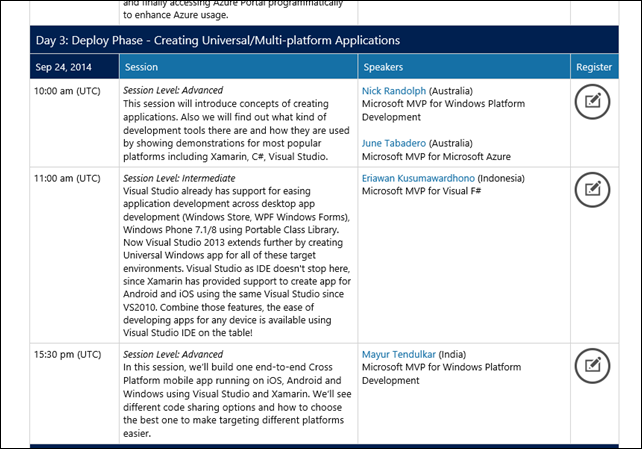
    After it’s decided by Katherine, I got my own sessions:

    ComCampSession_20140924

    Although there were some glitches when we’re rehearsing the presentations (with the assistance of Katherine), at the time of the Lync conference, the session is fine! Unfortunately the Android emulator were unexpectedly sluggish when I was having demo of running Xamarin code.

    I also gave demo of The Multi Device Hybrid for Visual Studio 2013 CTP 2, fortunately the demo went well. Smile